Related
ACME offers physical samples of five stationery products. The samples are useful, but they are not free to fulfil. Every request can create postage cost, warehouse handling, stock consumption, sales administration, Salesforce activity, and reporting noise.
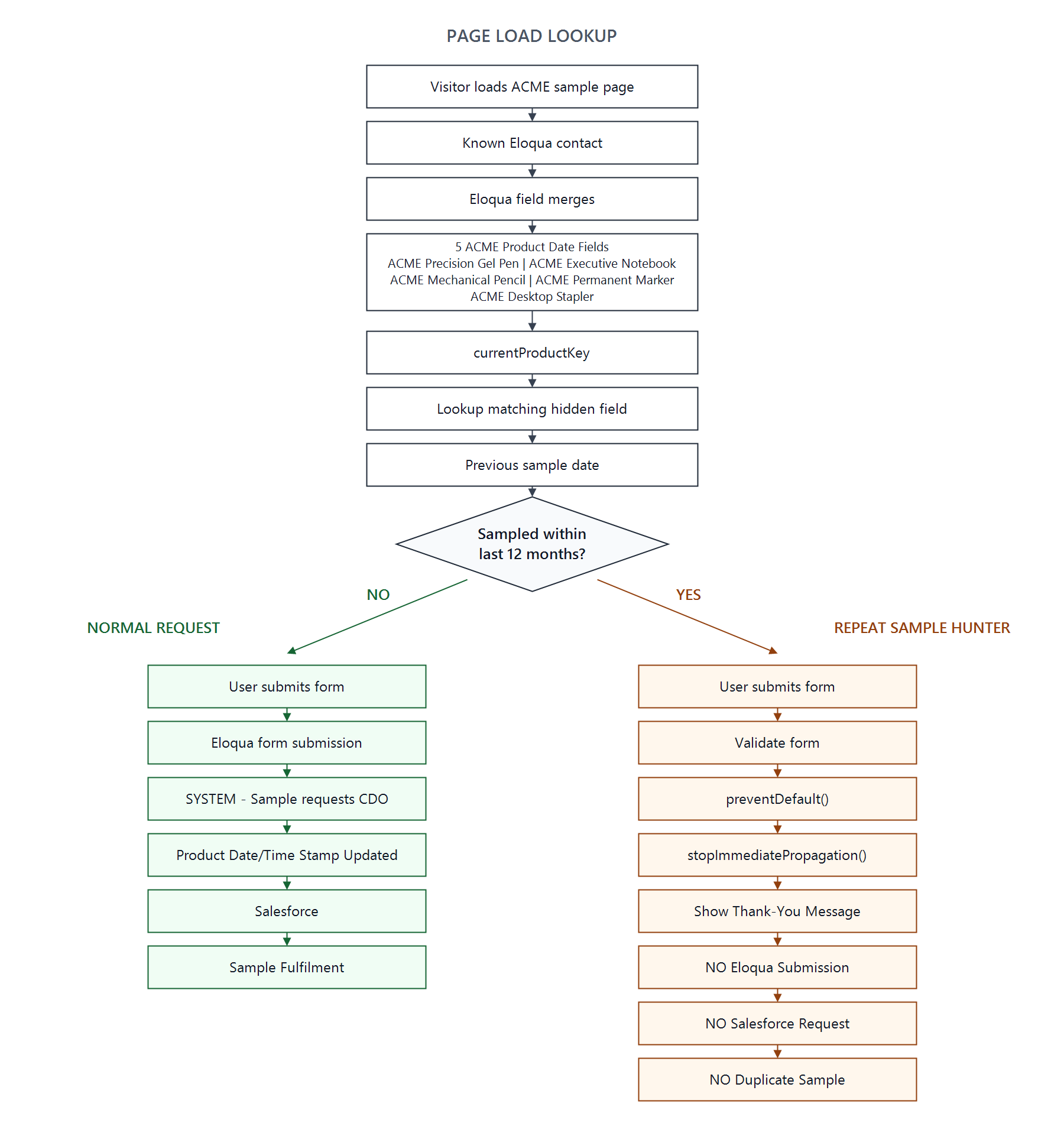
The control pattern is simple: detect the previous sample request before allowing the new request to enter the fulfilment process. If a known contact has already requested the same sample in the last 12 months, validate the form, stop the Eloqua submission and show a neutral on-page thank-you message.
Greg's Take
Most forms are built to capture demand. Fine. But when demand is repetitive, expensive and already known, the form is also where cost starts leaking. If Eloqua already knows when somebody last received the product, sending the same request through Eloqua, Salesforce and fulfilment again is not automation. It is waste with a workflow icon on it. The useful control is the one that stops the transaction before the expensive part starts.
Greg Staunton
The Problem
ACME wants people to try its products, but a repeat request for the same sample inside the agreed sampling window is operationally expensive. A duplicate sample can create a new Salesforce record, trigger a fulfilment workflow, consume stock and give sales teams another item to review.
The cheapest duplicate sample to fulfil is the one that never enters the fulfilment workflow.
The Architecture
The pattern uses data ACME already holds in Oracle Eloqua. When a known contact lands on the sample page, Eloqua field merges populate hidden inputs with that contact's previous sample dates. The visible form remains deliberately small: Email Address and a submit button.
The normal path is:
Form submission
  -> Eloqua processing
  -> SYSTEM - Sample requests
  -> Salesforce campaign / lead / contact processing
  -> sample fulfilment workflow
The Sample Hunter path is:
Recent previous sample detected
  -> form validated
  -> browser prevents submission
  -> local thank-you state
  -> no new Eloqua processing
  -> no new Salesforce sample request
  -> no fulfilment cost
How the Product Key Pattern Works
The important trick is that currentProductKey
does not contain the historical date. It contains the name of the
hidden field that contains the historical date for the product
currently being requested.
For the worked example, ACME is requesting
product_acme_precision_gel_pen.
JavaScript reads that product key and dynamically looks for the
hidden input with the same name. No JavaScript mapping object is
required, because the product key acts as a pointer to the right
hidden field.
var productKey = productKeyInput.value;

var productField = document.querySelector(
  'input[name="' + productKey + '"]'
);

var lastSampleDate = productField.value;
The Five ACME Product Date Fields
ACME uses exactly five fictional stationery products in this example. Each product has a stable product key and a field-merged hidden input containing the last sample date for the known contact.
| Product | Product Key |
|---|---|
| ACME Precision Gel Pen | product_acme_precision_gel_pen |
| ACME Executive Notebook | product_acme_executive_notebook |
| ACME Mechanical Pencil | product_acme_mechanical_pencil |
| ACME Permanent Marker | product_acme_permanent_marker |
| ACME Desktop Stapler | product_acme_desktop_stapler |
<input
  type="hidden"
  name="product_acme_precision_gel_pen"
  value="<span class=eloquaemail >ACME_Precision_Gel_Pen_Last_Sample_Date1</span>"
>
<input
  type="hidden"
  name="product_acme_executive_notebook"
  value="<span class=eloquaemail >ACME_Executive_Notebook_Last_Sample_Date1</span>"
>
<input
  type="hidden"
  name="product_acme_mechanical_pencil"
  value="<span class=eloquaemail >ACME_Mechanical_Pencil_Last_Sample_Date1</span>"
>
<input
  type="hidden"
  name="product_acme_permanent_marker"
  value="<span class=eloquaemail >ACME_Permanent_Marker_Last_Sample_Date1</span>"
>
<input
  type="hidden"
  name="product_acme_desktop_stapler"
  value="<span class=eloquaemail >ACME_Desktop_Stapler_Last_Sample_Date1</span>"
>
Base Eloqua Form
This is a stripped-down illustrative Eloqua form. The only visible field is Email Address. The rest of the data needed for routing, product context and historical lookup is held in hidden fields.
<form
  id="form25071713"
  name="ACME-SAMPLE-REQUEST"
  method="post"
  action="https://s.example.eloqua.com/e/f2"
>
  <input type="hidden" name="elqFormName" value="ACME-SAMPLE-REQUEST">
  <input type="hidden" name="elqSiteId" value="25071713">
  <input type="hidden" name="sFDCCampaignId" value="701000000000ACME">

  <input
    type="hidden"
    name="ProductKey"
    value="product_acme_precision_gel_pen"
  >

  <input
    type="hidden"
    name="currentProductKey"
    id="currentProductKey"
    value="product_acme_precision_gel_pen"
  >

  <input
    type="hidden"
    name="product_acme_precision_gel_pen"
    value="<span class=eloquaemail >ACME_Precision_Gel_Pen_Last_Sample_Date1</span>"
  >
  <input
    type="hidden"
    name="product_acme_executive_notebook"
    value="<span class=eloquaemail >ACME_Executive_Notebook_Last_Sample_Date1</span>"
  >
  <input
    type="hidden"
    name="product_acme_mechanical_pencil"
    value="<span class=eloquaemail >ACME_Mechanical_Pencil_Last_Sample_Date1</span>"
  >
  <input
    type="hidden"
    name="product_acme_permanent_marker"
    value="<span class=eloquaemail >ACME_Permanent_Marker_Last_Sample_Date1</span>"
  >
  <input
    type="hidden"
    name="product_acme_desktop_stapler"
    value="<span class=eloquaemail >ACME_Desktop_Stapler_Last_Sample_Date1</span>"
  >

  <label for="emailAddress">Email Address</label>
  <input
    type="email"
    id="emailAddress"
    name="emailAddress"
    required
  >

  <button type="submit">
    Request Sample
  </button>
</form>

<div id="thankyou-container" style="display:none;">
  <p>Thank you for your request.</p>
  <p>
    A member of the ACME team will contact you if any further
    information is required.
  </p>
</div>
The Sample Hunter JavaScript
The script looks up the historical sample date on page load. If there is no recent previous sample, it does not attach the blocking submit handler. Eligible visitors stay on the normal Eloqua path.
<script>
(function () {

  function parseDate(value) {
    if (!value) return null;

    var parsed = new Date(value.toString().trim());

    if (isNaN(parsed.getTime())) {
      return null;
    }

    return parsed;
  }

  function isWithinLastTwelveMonths(date) {
    if (!date) return false;

    var twelveMonthsAgo = new Date();
    twelveMonthsAgo.setMonth(
      twelveMonthsAgo.getMonth() - 12
    );

    return date >= twelveMonthsAgo;
  }

  function showOnPageThankYou() {
    var form = document.getElementById("form25071713");
    var thankYouContainer =
      document.getElementById("thankyou-container");

    if (form) {
      form.style.display = "none";
    }

    if (thankYouContainer) {
      thankYouContainer.style.display = "block";
    }
  }

  function runSampleHunter() {
    var form =
      document.getElementById("form25071713");

    var productKeyInput =
      document.getElementById("currentProductKey");

    if (!form || !productKeyInput) {
      return;
    }

    var productKey =
      productKeyInput.value.trim();

    if (!productKey) {
      return;
    }

    var productField =
      document.querySelector(
        'input[name="' + productKey + '"]'
      );

    if (!productField) {
      return;
    }

    var lastSampleDate =
      parseDate(productField.value);

    if (
      !lastSampleDate ||
      !isWithinLastTwelveMonths(lastSampleDate)
    ) {
      return;
    }

    form.addEventListener(
      "submit",
      function (event) {

        if (!form.checkValidity()) {
          event.preventDefault();
          form.reportValidity();
          return false;
        }

        event.preventDefault();
        event.stopImmediatePropagation();

        showOnPageThankYou();

        return false;
      },
      true
    );
  }

  if (document.readyState === "loading") {
    document.addEventListener(
      "DOMContentLoaded",
      runSampleHunter
    );
  } else {
    runSampleHunter();
  }

})();
</script>
Walking Through the Logic
On page load, the script reads
currentProductKey, finds the
hidden input with the matching name, parses that value as a date
and compares it with the date 12 months ago.
If the value is blank, missing, invalid, older than 12 months, or cannot be resolved, the function returns without changing the form. That is the fail-open behaviour. The protection is designed to prevent known repeat requests without risking legitimate requests because of a malformed historical value.
If the previous sample date is inside the last 12 months, the
script attaches a capturing submit handler. When the visitor
submits, HTML5 validation still runs. If the email field is
invalid, the browser reports the validation problem. If the form
is valid, the script calls event.preventDefault() and
event.stopImmediatePropagation(), hides the form and
shows the local thank-you container.
SYSTEM - Sample requests CDO
ACME's fictional Eloqua Custom Data Object is called SYSTEM - Sample requests. It is the historical record of legitimate sample requests. In this pattern there is one CDO record for one contact. The product-specific date fields on that contact's CDO record hold the last sample date for each product. The browser-side script is not writing to the CDO. Instead, normal Eloqua form submission reaches Eloqua processing, and that processing updates the relevant product date field on the contact's CDO record.
Successful Eloqua sample request
  -> contact's SYSTEM - Sample requests CDO record
  -> date field for the requested product updated
A simple conceptual schema could look like this:
| Field | Purpose |
|---|---|
| Contact Email | Links the CDO record to the known contact. There is one sample-history CDO record for this contact. |
| ACME Precision Gel Pen - Last Sample Date | Date stored against this product on the contact's CDO record. This is the value the field merge exposes when this product is being checked. |
| ACME Executive Notebook - Last Sample Date | Date stored against this product on the contact's CDO record. This is the value the field merge exposes when this product is being checked. |
| ACME Mechanical Pencil - Last Sample Date | Date stored against this product on the contact's CDO record. This is the value the field merge exposes when this product is being checked. |
| ACME Permanent Marker - Last Sample Date | Date stored against this product on the contact's CDO record. This is the value the field merge exposes when this product is being checked. |
| ACME Desktop Stapler - Last Sample Date | Date stored against this product on the contact's CDO record. This is the value the field merge exposes when this product is being checked. |
The key point is that the selected product determines which date field matters. The product key on the page points the JavaScript at the matching hidden field, and that hidden field is populated by the field merge for the date stored against that product on the contact's CDO record. If that date is within the sampling window, the request is blocked before it reaches Eloqua processing, Salesforce or fulfilment.
Why Salesforce Never Sees the Blocked Request
Preventing the Eloqua form submission matters because downstream systems usually react to successful form processing. If the form is never submitted, there is no new Eloqua processing, no new CDO update, no new Salesforce sample request and no duplicate fulfilment task.
This is why the blocking handler is attached conditionally. For an eligible visitor, the existing Eloqua form behaviour remains untouched. For a known repeat sample hunter, the submit event is intercepted only after the page has already detected a recent previous sample for the same product.
Security and Architecture Caveat
This is an operational cost-control pattern, not an authentication or security control. A technically determined visitor can manipulate client-side JavaScript or construct a direct form request.
For higher-value or abuse-sensitive fulfilment, reinforce the same 12-month rule in Eloqua processing, in an API layer, in middleware, in Salesforce, or before fulfilment. The browser-side version still has value because it improves user experience, prevents ordinary repeat requests, avoids unnecessary submissions and reduces operational noise.
Business Value
The practical value is not abstract. ACME gets reduced repeated sample fulfilment, lower postage and warehouse cost, reduced sales administration, fewer unnecessary Salesforce records, cleaner sample programme reporting, less stock consumed by repeat sample hunters, a consistent 12-month sampling rule and less manual review.
The pattern works because it uses known platform data at the point where the cost begins. It does not ask fulfilment to clean up the problem later. It stops the avoidable transaction at the edge of the workflow.
Implementation Considerations
- Keep the visible form small if the page is only demonstrating the prevention pattern.
- Use stable product keys that match the hidden field names exactly.
- Make sure field merges return dates in a format JavaScript can parse consistently.
- Test known contacts with no history, old history, recent history and malformed history.
- Confirm blocked requests do not create Eloqua form activity, CDO records, Salesforce campaign members or fulfilment tasks.
- Mirror the rule server-side when the sample has high cost or abuse risk.
Final Thoughts
Sample Hunter prevention is a good example of marketing operations architecture doing its job. The form still captures legitimate demand. Eloqua still updates the CDO when a request is valid. Salesforce still receives the requests it should receive. The only thing removed is repeat fulfilment that ACME already had enough data to avoid.
Related
Passing GA Data to Eloqua Forms
Read articleRelated