Eloqua Blog · Email Deliverability
Part 2: Eloqua Email Deliverability - Who Is Involved?
Deliverability is not just an Eloqua admin problem. It depends on senders, gateways, recipients, ISP limits, blocks, blacklists and engagement signals.
📅 First published: Aug 25, 2021
⏱ Reading time: 8 minutes • 👤 Author: Greg Staunton • 🎯 Focus: Eloqua deliverability, ISPs, spam filtering, open rates

This is part 2 of my Eloqua email deliverability series. I strongly advise you to read Part 1, which covers the objective of Eloqua email deliverability. If you already have, crack on.
Greg Staunton
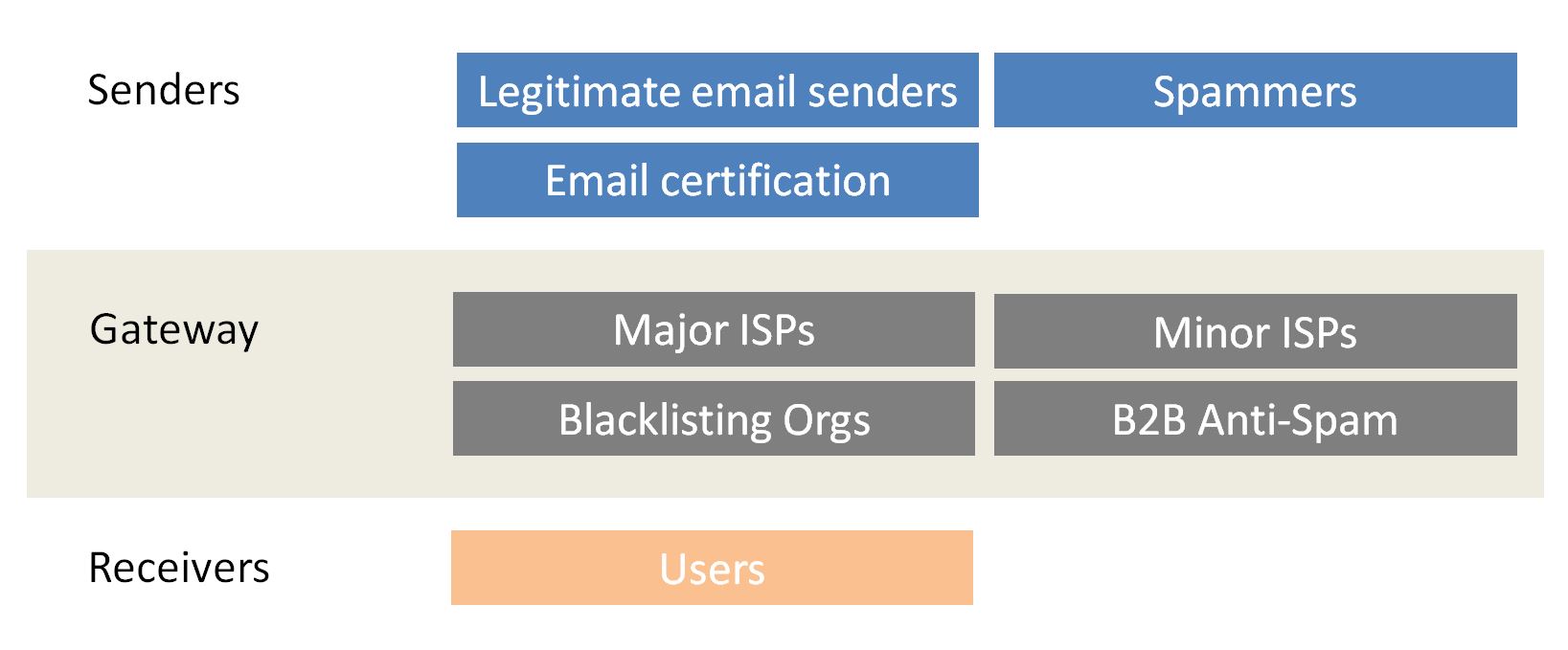
Three parties are required to get an Eloqua email into the recipient's inbox: senders, gateways and recipients.
Email Senders
The company or organization sending the email. Senders include legitimate email senders, certification providers and spammers.
Email Gateways
The companies and systems that enable or control email delivery, including ISPs, anti-spam systems and blacklisting organizations.
Recipients
The customers you want to reach. ISPs are trying to protect them from unwanted email, so their behaviour matters.
Email Senders And Gateways
Email Senders
- Legitimate email senders have a valid reason for sending emails, such as transactional emails, marketing emails or newsletters.
- Email certification providers are not exactly senders, but they can help you send emails efficiently and bypass some ISP filters.
- Spammers send large volumes of unsolicited messages. This can be malicious, such as malware or phishing, or simply unwanted and annoying.
Email Gateways
- Major ISPs are the deliverability audience you should care about most. If you can deliver well to them, minor ISPs are usually easier.
- Minor ISPs often use similar algorithms to major ISPs, sometimes with tweaks for a specific region or industry.
- B2B anti-spam systems are difficult because each business configures its own rules, which can become a blocker for Eloqua email deliverability.
- Blacklisting organizations can seriously affect Eloqua email deliverability. If you end up on a blacklist, getting removed should become your top priority.
Eloqua Email Recipients
Your goal is to reach recipients, and the ISP's goal is to protect those people from spam. If you want to get Eloqua email into the inbox, you need to understand the tools used to fight spam.
How Can ISPs Affect Eloqua Email Deliverability?
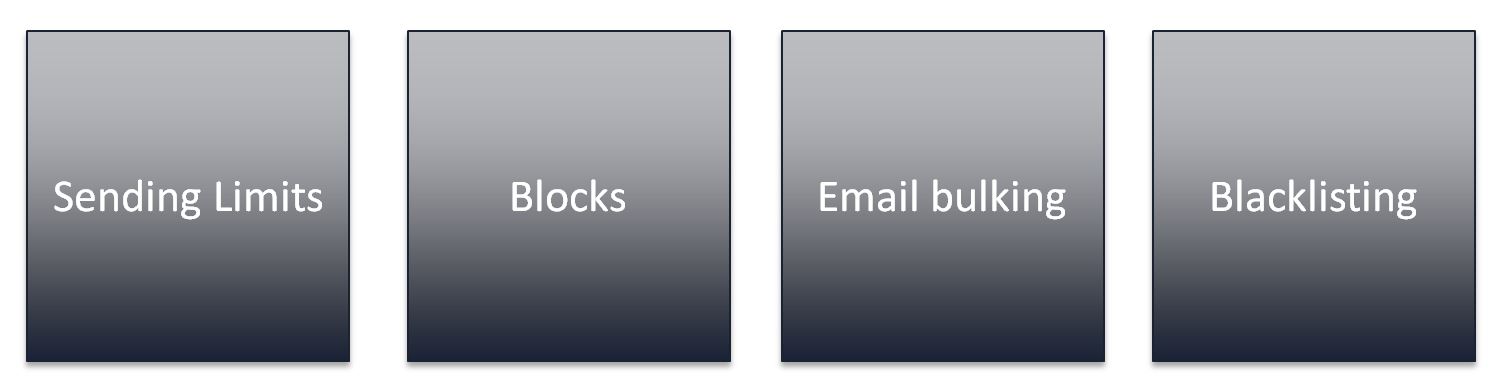
To keep spammers away from your inbox, ISPs use several methods. Because they have to manage huge volumes of email, those same methods can affect your Eloqua email deliverability.
Eloqua Email Sending Limits
ISPs set sending limits to control how much email you can send in a set period. Once you hit a limit, they may soft bounce later emails until the limit resets.
Gradually increase Eloqua send volume at least 30 days before a large global campaign. Eloqua email throttling can help with this.
Blocked Eloqua Sending IP Address
Blocks stop emails from being sent. ISPs typically block senders after too many spam complaints or too many hard bounces.
It is better to prevent ISP blocks than fix them afterwards. Keep lists clean, send to engaged audiences and make unsubscribing easy.
Email Bulking
Bulking means ISPs automatically send your email to spam or junk folders. Most people do not check those folders regularly, so your email may never be seen.
Blacklisting
Blacklisting is a more severe form of blocking and lasts until the blacklisting organization removes you from the list.
How Can You Tell If Eloqua Email Goes To Spam?
Eloqua does not let you detect spam folder placement directly through dashboards or Insight. You can, however, analyze third-party mail analytics reports and look for open and click rate drops by ISP.
If one ISP suddenly drops in both open and click rates while others stay steady, that is strong evidence that your emails are going to spam folders.
An Eloqua ISP seed list is another option, but it should not be used to warm up new IPs. Seed list accounts do not show engagement, so they may damage reputation and reduce deliverability.
Which Attributes Do ISPs View As Negative Or Positive?
Eloqua email deliverability decisions are binary for ISPs. They see negative behaviours and positive behaviours. If you minimize the negative and maximize the positive, you will deliver more Eloqua emails.
Negative Attributes
- Bounces: Hard bounces suggest list quality problems. Soft bounces can suggest inconsistent send volume.
- Spam complaints: ISPs have very low tolerance for them. Keep spam complaints below 0.1%.
- Spam traps: Pristine traps suggest bad collection practices. Recycled traps suggest list hygiene problems.
- Non-opens and deleted emails: ISPs can observe ignored or deleted emails and treat them as weak engagement signals.
Positive Attributes
- Add to address book or contacts: A strong signal that the recipient wants your emails.
- Good open and click-through rates: Good senders send emails that are opened and clicked.
- Email forwards: ISPs view forwarded content as something people found interesting.
- Replies: Replies mean engagement. Avoid no-reply sender patterns where possible.
What Is A Good Open Rate For Eloqua Emails?
You may experience delivery problems if your open rates are weak. Open rates can be thought of like online reviews, ranging from excellent to not ideal.
Key threshold
Eloqua email deliverability issues often start when open rates fall below 20%.
Open rates below 10% suggest fundamental problems with your list or content. In the 15-19% range, you may occasionally see deliverability issues. From 10-14%, you are likely to see more problems and will need to work hard to improve open rates.
Now that you know who is involved with getting Eloqua email into the inbox, the next step is Part 3. Eloqua email deliverability factors that you control.