Eloqua Blog · Architecture
Part 4. Eloqua User Access Levels
Define sensible Eloqua security groups so users have the access they need, without giving everyone the keys to the whole platform.
📅 First published: May 24, 2022
⏱ Reading time: 9 minutes • 👤 Author: Greg Staunton • 🎯 Focus: Eloqua security groups, licensing, interface access, permissions

One of the first considerations you will need is what different levels of Eloqua user access do you want users to have? If everyone can do anything they want you are going to have some serious problems, fast.
Greg Staunton
Do You Really Want To Give Everyone Unrestricted Access To Eloqua?
Within a larger organization there will be times when it is appropriate to grant access to certain features of the Eloqua platform to certain users. For example, would you want a sales person being able to update complex assets that an agency has created for you? Would you want to give your most junior marketing person that has not finished Eloqua training the power to email your entire database? Probably not in both cases.
When implementing Eloqua most companies protect themselves by defining different types of user and then restricted access levels to certain parts of the platform.
My Eloqua User Access Levels guide has been developed so that you will be able to develop different Eloqua user types and then document them using the Eloqua Architecture Document.
Eloqua User Access Levels Overview
The Eloqua User Access Levels overview has been divided into five parts:
- Eloqua User Access Level Overview
- Eloqua User Access Levels - Licensing
- Eloqua User Access Levels - Interface Access
- Eloqua User Access Levels - Action Permissions
- Eloqua User Access Levels - Asset Creation
Eloqua User Access Level Overview
Initially you will need to define the different types of Eloqua users you are going to have within your organization. In Eloqua terms these are known as Eloqua security groups.
Eloqua security groups allow the organization to control what users can create, modify, access or delete depending on their function. Whilst Eloqua comes with several different types of users prebuilt, most organizations will move away from them and develop their own.
It should be noted that the rest of this guide and subsequent Eloqua Architecture Documentation updates should be carried out regardless of whether you are using default Eloqua security groups or your own bespoke ones.
The Eloqua User Access Level Overview is broken out into columns.
Eloqua User Type
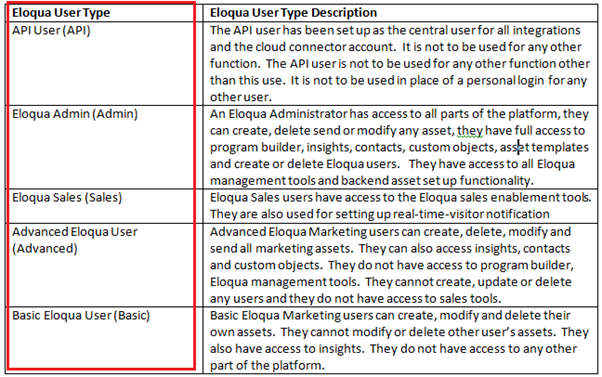
The Eloqua User type is the name given for the Eloqua Security Group that you are going to create. It is best practice to make this descriptive so your Eloqua Administrator can easily identify the correct Eloqua Security Group that they should add Eloqua Users to.
Eloqua User Type Description
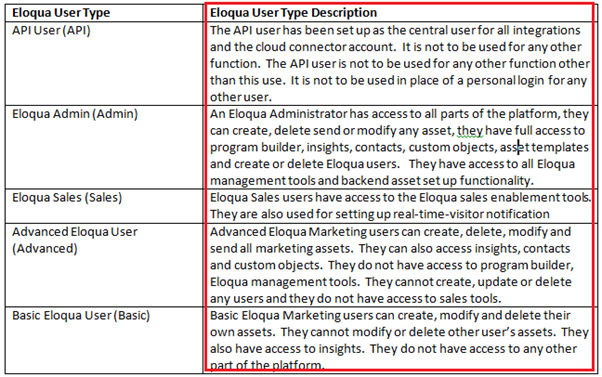
The Eloqua User Type description column is used to give a brief description of what the Eloqua User Type has access to.
Eloqua User Access Levels - Licensing
It is often useful for an Eloqua Administrator to set up access to particular Eloqua products. There are two main reasons for this:
- Volume of licenses and allocation of licenses
- Platform inappropriate to job role
Licensing can be granted at both the individual level and the Eloqua Security Group level.
Once you have decided which products should be given to which user you will need to update your Eloqua Architecture Document.
Currently there are five different platforms that you can give users access to.
Eloqua Analyzer

Eloqua Analyzer is a powerful custom reporting module which allows the user to create very bespoke reports. Organizations that purchase Eloqua Analyzer only get a certain number of licenses for this product so access is granted only to certain individuals.
Eloqua Engage

Eloqua Engage is part of the Eloqua Sales Tools. It allows marketing to set up Eloqua templates for emails that Sales send out to their prospects and customers. It ensures that all outbound emails have the same branding and quality of emails that marketing have built, whilst harnessing the power of tracking recipient behaviour.
Organizations that purchase Eloqua Engage will usually have a limited amount of licenses because it comes at an additional cost. Access to this product is usually limited to sales since no other parts of the organization would need to use it.
Eloqua Marketing Platform

The Eloqua marketing platform is the core platform that organizations purchase. This is the most in demand license since all marketers that use the platform will need access to it. If an Eloqua user has not been given access to it, for example sales, they will only see their user profile when they login.
Eloqua Profiler

Eloqua profiler is a sales tool that is used within the CRM platform to give sales an overview of a contact's activity. Using Eloqua profiler a salesperson can drill into all the activity that a contact has had with campaigns, the website, emails, forms, etc straight from the contact or lead record in the CRM. It also holds several other pieces of information about the contact.
Eloqua Reporting
Eloqua reporting is the basic reporting feature that comes out of the box. Most marketers will need to access email reports, campaign reports, etc. They can do this using the pre-built reports that are available.
Eloqua User Access Levels - Interface Access
The Eloqua Security Groups Interface Access control panel allows Eloqua Administrators to allow or deny the use of certain features of the product to different levels of users. If a user has not been given permission to use a certain feature then they will not see it when they login.
You have the ability to drill into Eloqua interface access up to three levels deep, giving you absolute control.
Once you set your Interface Access for each user you must update your Eloqua Architecture Document.
There are six main areas for setting Eloqua Interface Access.
Eloqua Assets
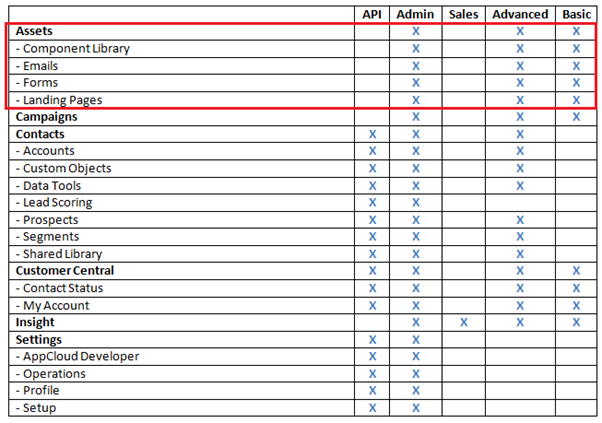
The Eloqua Assets part of the Eloqua Interface Access gives users access to building out, modifying or deleting marketing assets. This is only access to the interface. You can set exact permission on what they can do with their access under Eloqua Asset Permissions.
Eloqua Campaigns
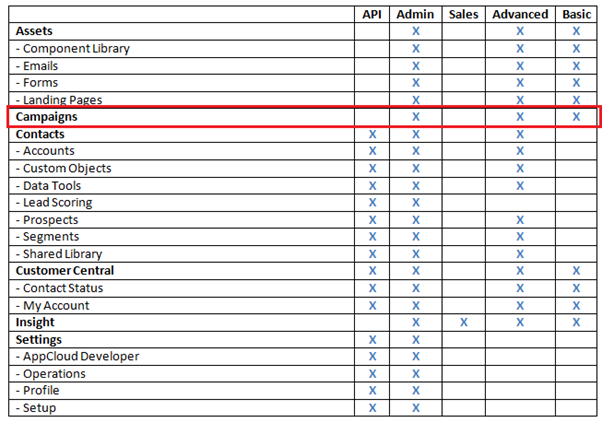
The Eloqua Campaigns part of the Eloqua Interface Access gives users the ability to access Campaign Canvas.
Eloqua Contacts
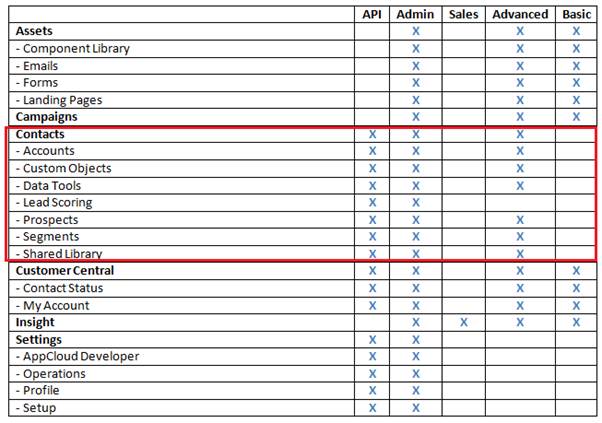
The Eloqua Contacts part of the Eloqua Interface Access gives users the ability to access the Eloqua database and the different components that make it up.
Eloqua Customer Central
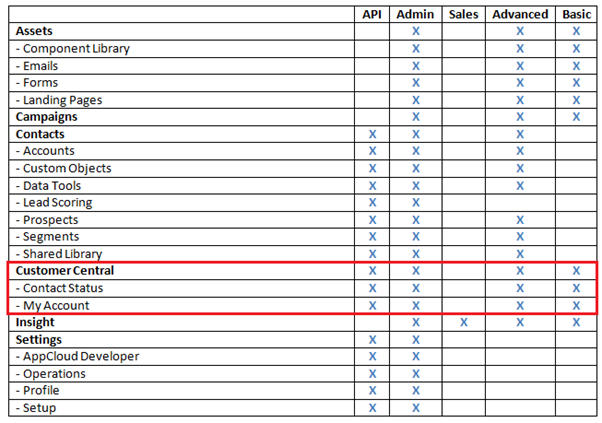
The Eloqua Contact Central part of the Eloqua Interface Access gives users the ability to access Eloqua Customer Central. From here they can:
- Search the Eloqua Knowledge Base
- Contact Eloqua Support
- Access Eloqua Training
- Use Topliners
Eloqua Insight
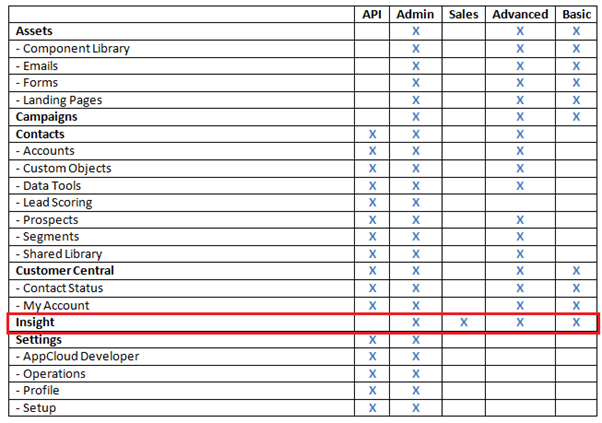
The Eloqua Insight part of the Eloqua Interface Access gives users the ability to access the standard reports that come pre-built.
Eloqua Settings
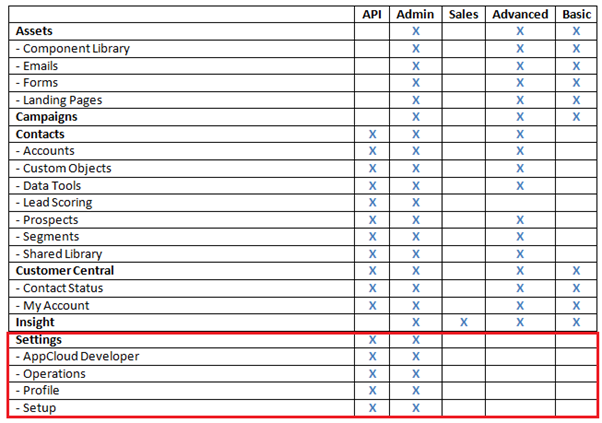
The Eloqua Settings part of the Eloqua Interface Access gives users the ability to access the most sophisticated parts of the platform. Examples would be:
- Cloud Apps
- Program Builder
- Integration Module
- User Creation
Careful consideration should be taken when granting access to all these parts of the platform.
Eloqua User Access Levels - Action Permissions
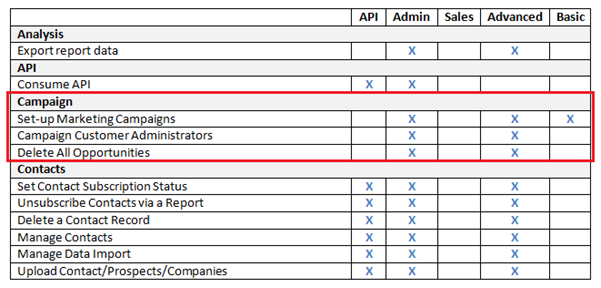
Action Permissions in Eloqua User Access Levels are used to allow access to certain parts of the Eloqua Interface Access they have been given.
In the example below you can see that both Advanced Marketing Users and Basic Marketing Users have been given access to campaigns in Eloqua. It would probably be appropriate to not allow Basic Marketing Users to delete campaigns, yet still allow them the ability to create campaigns. In the example below you can see this in action.
Once you set your Action Permissions for each user you must update your Eloqua Architecture Document.
Eloqua User Access Levels - Asset Creation
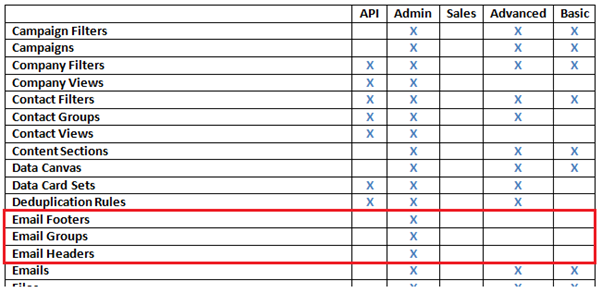
The Asset Creation section of setting Eloqua User Access Levels allows you to define exactly what types of assets a user can create.
For example you may wish to retain complete control as an Eloqua Administrator to create and update email headers and footers because of the technical nature of them. If another user has to create one there is a risk that they will not put in the correct code for the “view as a web page” link or the “unsubscribe link”. In the example below you can see that the only person that can create email headers and footers is the Eloqua Administrator.
Once you set your Asset Creation levels for each user you must update your Eloqua Architecture Document.
Related Eloqua article
Eloqua implementation
User access levels are one part of the wider Eloqua architecture work that should be agreed after SmartStart.
Read article