Eloqua Blog · Salesforce Reporting
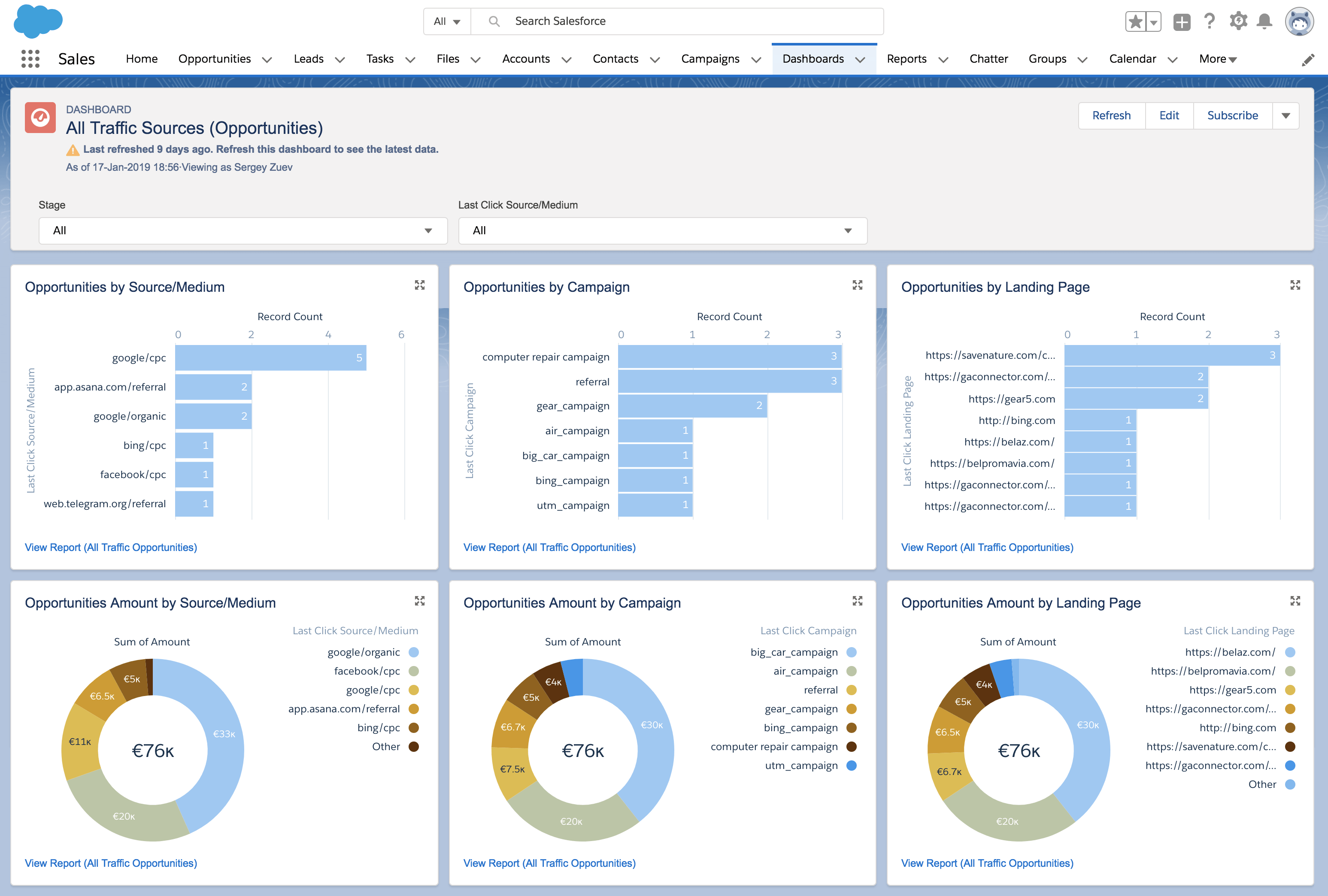
HMH: Eloqua Campaign Reporting On SFDC Dashboards
How HMH moved from inconsistent campaign and lead data toward reliable CMO dashboards in Salesforce, with Eloqua feeding the reporting model properly.
📅 First published: Jun 11, 2021
⏱ Reading time: 10 minutes • 👤 Author: Greg Staunton • 🎯 Focus: Eloqua, SFDC dashboards, campaign ROI, lead management
Client Challenge
HMH approached Automate2Revenue, who I was contracted to, with a clear reporting goal: deliver Salesforce CMO dashboards in early 2021 that reflected the current state of lead management and campaign performance.
The wider objective was to agree a best-practice approach for lead and campaign management, then show how that strategy would meet customer needs, support revenue goals and resolve internal data pain points.
The core issue was that accurate CMO dashboards need accurate upstream data. HMH needed campaign, lead, contact, campaign member and opportunity data to be reliable enough to drill into campaign ROI by medium.
Two Problem Areas
- Lead management data was incomplete and inconsistent.
- Campaign management data was fragmented across Eloqua, Salesforce, Workfront, Sprinklr and Google Ads.
- The dashboards could only work once the data model and campaign process were cleaned up.
Lead Management Issues
- Missing key data on lead and contact records.
- 43,924 rejected leads that year, including 26k in September likely due to clean-up.
- Too many lead status values and poor consistency between lead and account status.
- 41,258 records with no Original Lead Source.
- Poor digital experience around forms on the website.
Campaign Management Issues
- Campaign channels were inconsistent and often inaccurate.
- Workfront campaigns had little or no connection to Eloqua.
- Social campaigns were created in Sprinklr.
- Google Ads could not be tracked reliably in Eloqua or Salesforce.
- Campaign responses and webinar tracking were inconsistent.
Approach
I took a backwards approach: start with the CMO dashboard outcome, then work back through the data, integrations, campaign templates and lead lifecycle processes required to make those dashboards trustworthy.
The technical solution design broke the work into discrete areas so Eloqua could feed Salesforce with the right data and Salesforce could report on campaign influence properly.
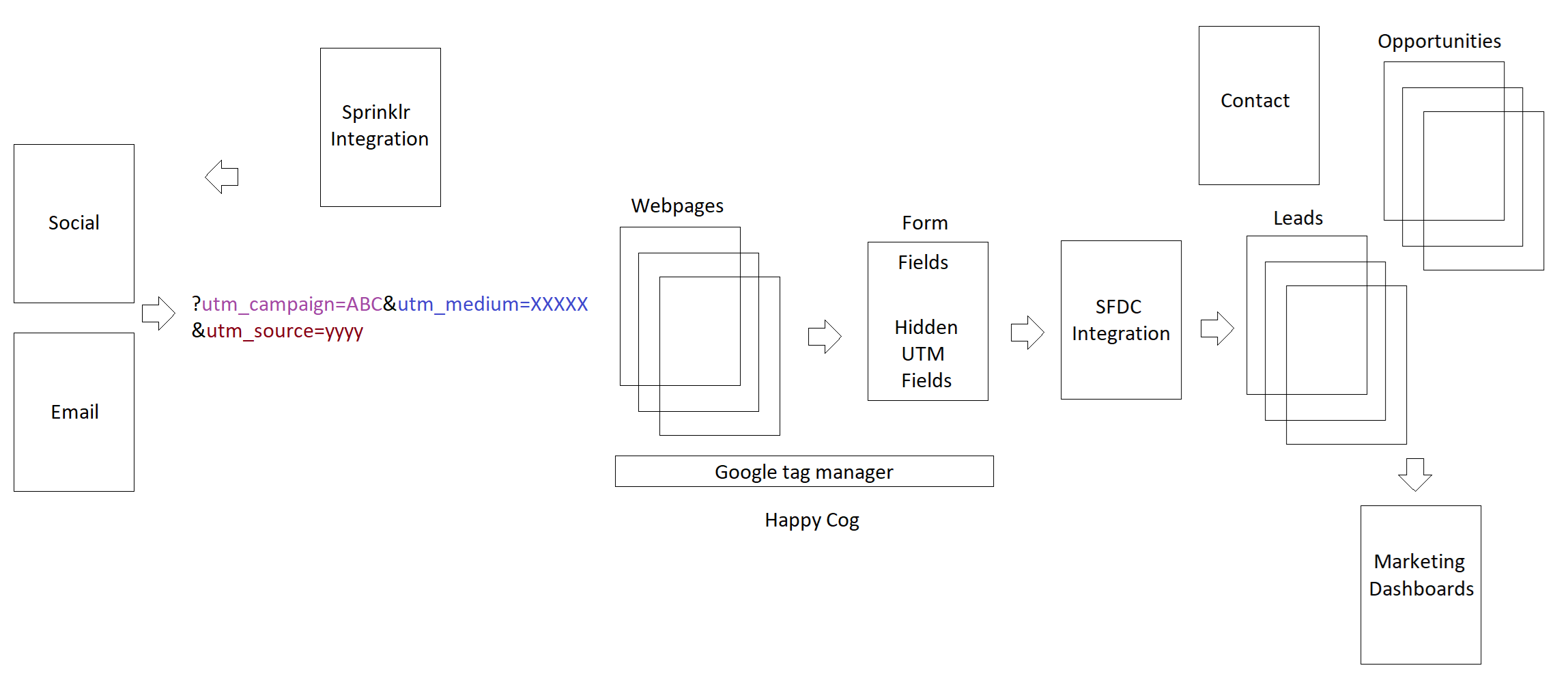
Solution 1: Minimum Mandatory Fields
The first step was defining the minimum mandatory contact fields and cleaning up the picklists that would underpin reporting. Lead status and UTM values needed to be controlled before dashboard output could be trusted.
| Lead Source / UTM Medium | Description |
|---|---|
| CPC | All digital paid advertising, including paid social. |
| Internal HMH customer-facing emails. | |
| SOCIAL | Organic posts on Facebook, Twitter, LinkedIn and YouTube. |
| Print advertising booked through the agency. | |
| PAID MEDIA | Digital advertising booked through the agency for education-specific sites and limited-audience emails. |
| DIGITAL PRINT | Digital versions of print ads. |
| EXTERNAL EMAIL | Dedicated or advertorial emails sent through partners. |
| MICROSITE | A specific subset of paid media. |
| DIRECT MAIL | Brochures, flyers and postcards distributed through mail, sales reps or online. |
| SEARCH | Incoming traffic from search engines. |
Solution 2: Eloqua / SFDC Integration App Migration
Oracle no longer supported Eloqua Native Integration Studio after 21 February 2021. That created the right moment to redesign and fully map the Salesforce integration.
The migration also created an opportunity to implement closed-loop reporting, even though the dashboard reporting itself would sit in Salesforce using lead, contact, campaign member and opportunity objects.

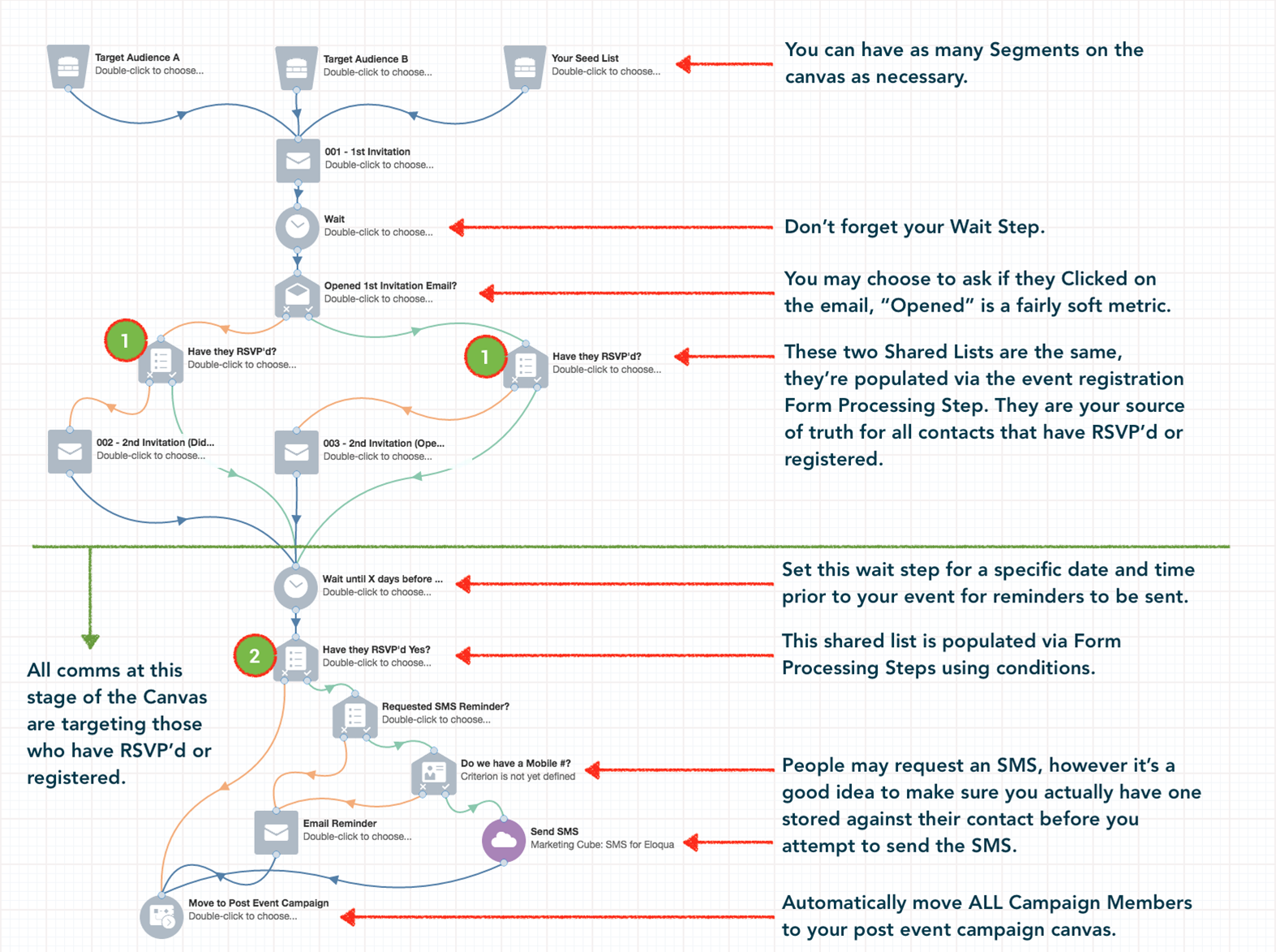
Solution 3: Standardised Campaign Templates
We developed standard Eloqua campaign canvas workflow templates so campaign structure was no longer reinvented every time.
- One-shot emails
- Lead nurture
- Tradeshows
- Webinars
- Sampling site journeys
Solution 4: Eloqua / Sprinklr Integration
Sprinklr integration apps were included so social and analytics activity could connect into the reporting model.
- Sprinklr / GA integration
- Sprinklr / Eloqua integration
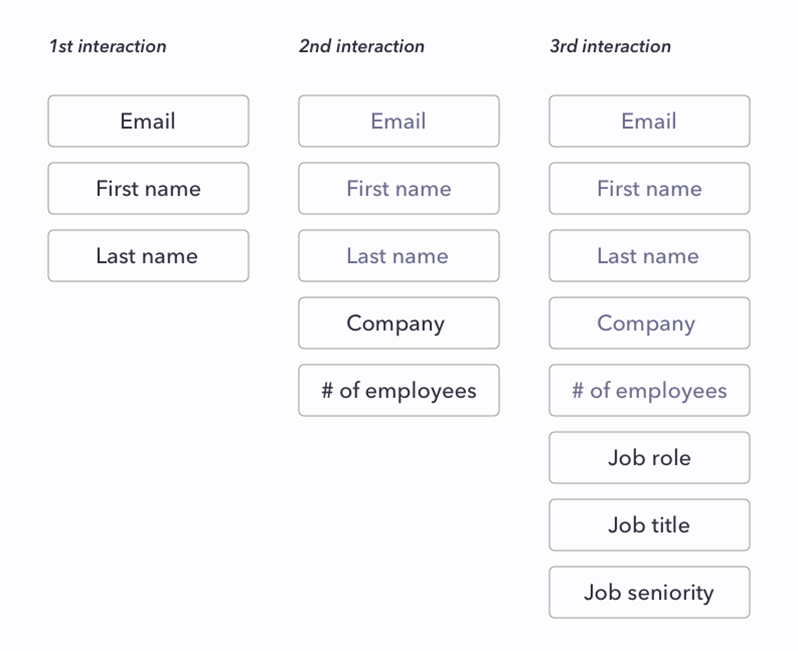
Solution 5: Template Form Types
Template forms were created for every form type. This also opened the door to progressive profiling, but it required landing page template standardisation by type.
Solution 7: Workfront Integration
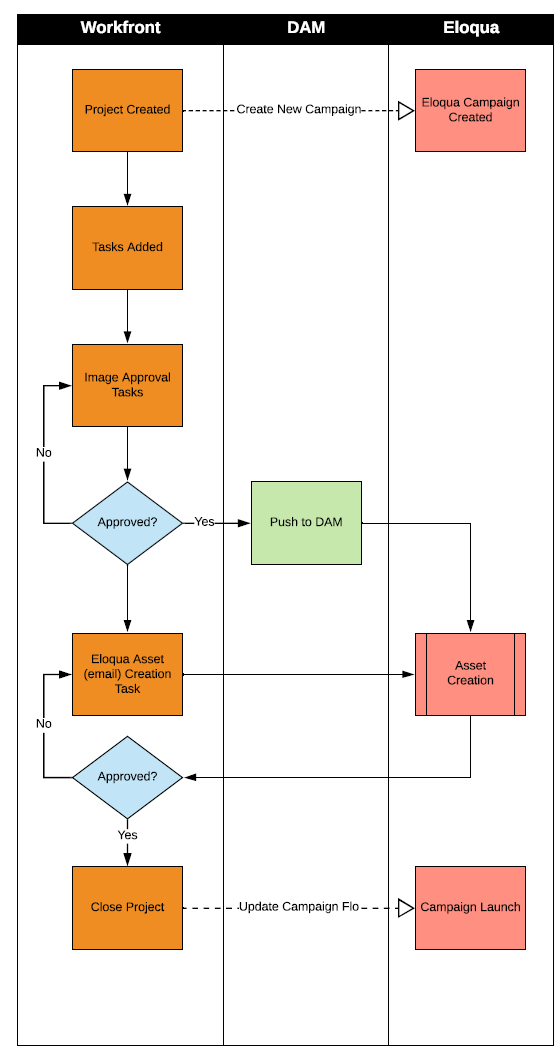
We explored Eloqua / Workfront integration, but it ended up not being required. The Workfront integration still was not suitable for Eloqua, so Oracle Content Manager, or Compendium in old money, was the better fit.
The main lesson was simple: campaign planning tools only help reporting when they can feed campaign metadata into the execution and CRM layer consistently.
Solutions 8 And 9: Lead Recycling And Lead Source
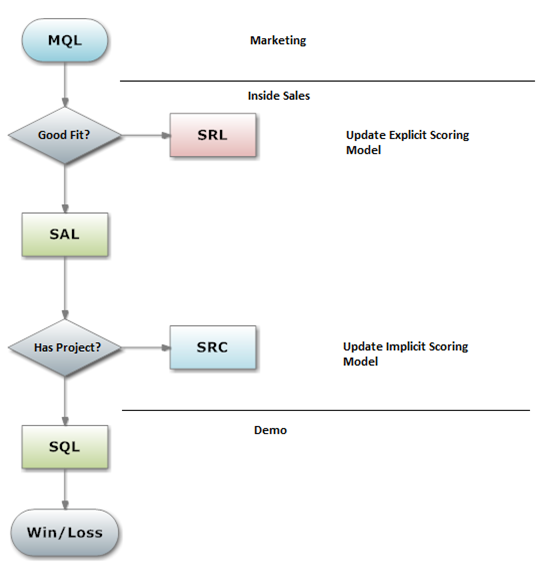
Rejected leads would be analysed so the profile model could be updated. Recycled leads would be analysed so the engagement model could be updated, then moved into a lead nurture programme.
The 2020 lead source programme assigned original lead source values from lead CDOs and created a lead source washing machine to keep campaign reporting cleaner over time.
Best-in-class target
MQL to SAL: 90% · SAL to SQL: 70%
Impact
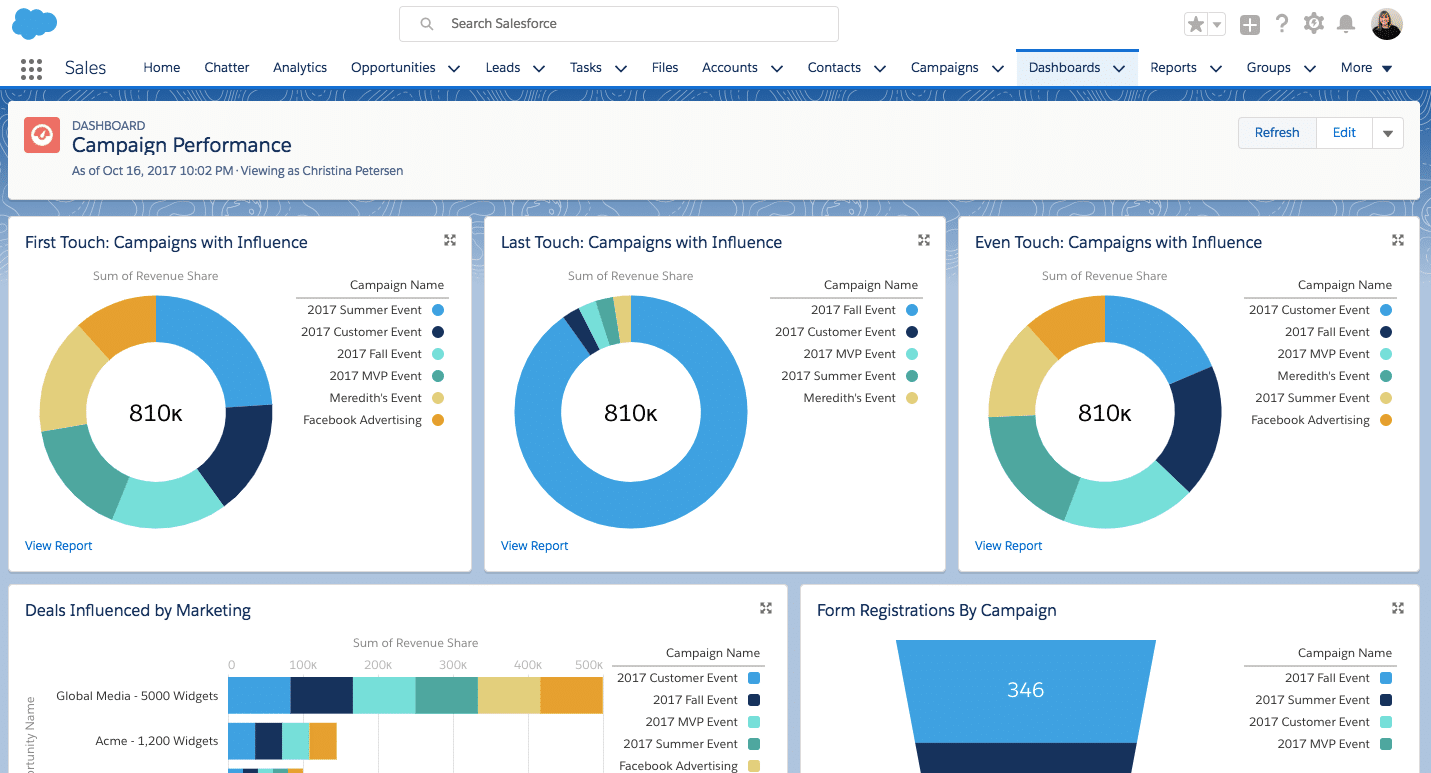
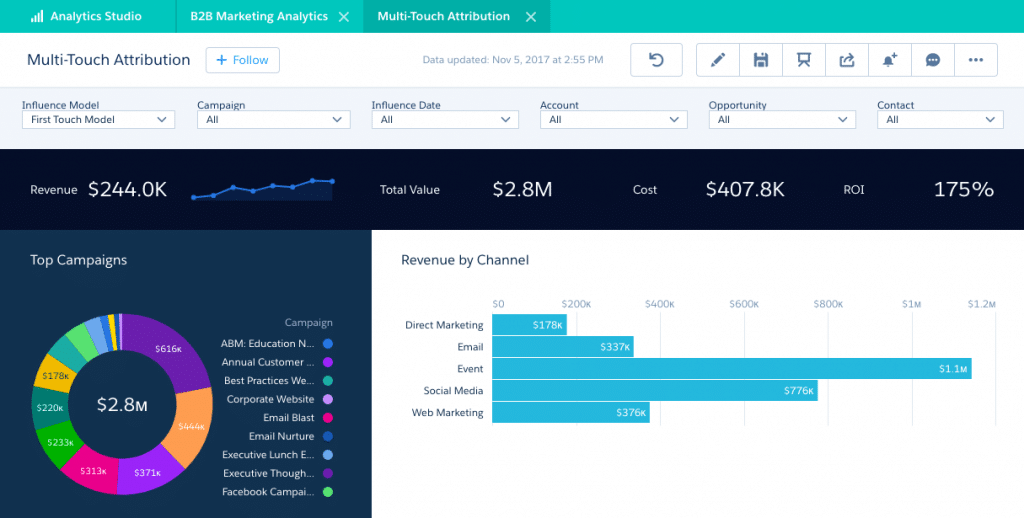
The impact was visible in the reporting. Once the campaign taxonomy, lead source handling and Eloqua-to-Salesforce process were aligned, HMH could show campaign influence and attribution in the dashboards that leadership cared about.
Related case study
HMH Eloqua consultant case study
A wider view of the HMH Eloqua work behind lead management, campaign reporting and Salesforce integration.
Read articleRelated Eloqua article
Integrating 1 Salesforce instance with 2 Eloqua instances
A practical Salesforce and Eloqua integration blueprint for complex enterprise reporting models.
Read article