
Eloqua Blog · Architecture
Part 5. Eloqua Master Exclude
Set up the people, domains and filters that should never receive outbound Eloqua marketing emails.
📅 First published: May 25, 2022
⏱ Reading time: 7 minutes • 👤 Author: Greg Staunton • 🎯 Focus: Eloqua master exclude lists, blocked domains, governance

There will be times that you do not want email to get sent to contacts for a multitude of reasons. This guide will teach you how to set these up, what they mean and how to update your Eloqua Architecture Document.
Greg Staunton
Blocking Domains From Outbound Eloqua Emails
Sometimes you do not want to send emails out to certain people.
As part of your Eloqua implementation you are going to no doubt set up a list of contacts that you do not wish to send emails to. Reasons for this vary from organization to organization but most commonly we see that companies want to block:
- Senior executives
- Competitors
- Free webmail
- Spam traps
Use this guide to help you evaluate how to choose your master exclude list and then document it on your Eloqua Architecture Document.
Eloqua Blocked Domain Overview
There are seven different ways that the Eloqua platform allows you to block contacts from receiving outbound emails. These are:
- Contact group members
- Filter contacts
- Search for individuals
- Email recipients
- Email group members
- Domains
- Custom objects
At this point it is worth noting that the Eloqua platform will by default not send emails to unsubscribed or hard bounced contacts unless specifically instructed to using override capabilities. This is why they have not been listed on this guide.
Although there are seven different ways to block contacts, the most common methods are contact group members, individuals, domains and filters.
Contact Group Members
Using Eloqua contact groups allows you to ring fence individual addresses of contacts for certain reasons. You can simply upload or add new members to your contact group any time you want to from the contacts section of the Eloqua platform. It is best practice to use your naming convention to name your lists and segregate them under the rationale for blocking them from receiving emails.
For this example we are going to use two contact groups.
GLOBAL_Master_Exclude_SPAMTRAPS is a contact group list of known spam trap email addresses.
It is a known guerrilla marketing technique to sign up to competitor mailing lists using spam trap email addresses. You probably have some in your database right now. This contact list would get periodically updated by the Eloqua administrator whenever they do an extract of the database for contacts with the word SPAM in the email address.
GLOBAL_Master_Exclude_TROUBLE is a contact list of known email abuse complainers.
A situation we came across in real life highlighted the need for this. An unscrupulous German purchased the domain a.de and set the email address to [email protected]. The company we were working with received an email from this individual's lawyers claiming that he was being spammed because the company had sent outbound email to this address. Since he had not double opted in to outbound communications from the company in question he was demanding compensation.
The complainant did not win anything and we will not discuss details here, but they ended up on the TROUBLE list.
Once you have identified, created and set your master exclude contact groups you need to add them to your Eloqua Architecture Document. There are two columns you will need to complete for this.
Contact Group Name

The Eloqua contact group name has the exact name of the contact group that you have created.
Contact Group Description

The Eloqua contact group description contains a brief description of the contacts that have been put in the contact group.
Individuals
It may be appropriate to drop certain individuals into the Eloqua master exclude. The reason for this is usually because they are very important people within your own organization that you may wish to exclude from receiving marketing emails from Eloqua.
This example was used for an organization that wished to block their C-Level executives from receiving marketing emails from Eloqua. There were good reasons for this.
When you have set the individuals that you do not wish to receive emails you must update the Individuals section of the Eloqua Architecture Document. In the Eloqua Architecture Document there are two columns that you must fill in.
Contact Email Address

Reason For Exclude

Domains
It is also best practice to block certain domains from receiving the emails you send from Eloqua. Whilst there are many reasons for blocking domains the three we most commonly see are:
- Competitors
- Analyst firms
- Free webmail
Once you have identified the domains that you wish to block you will need to add them to your Eloqua Architecture Document.
There are two columns in the Eloqua Architecture Document.
Domain
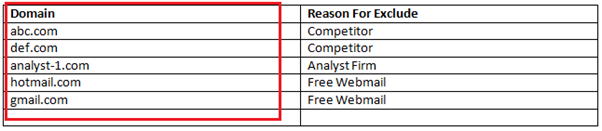
Now add in your reason for exclude.
Filter Contacts
The final common method employed by organizations setting up their master exclude list in Eloqua is to use filters.
Filters allow the exclude list to use the same logic they would use to build a segment. Common filters we see are for:
- Spam traps
- Hidden competitor addresses
Spam traps is fairly self-explanatory. Hidden competitor analysis email addresses are ones that competitors may use to monitor all of their competition's outbound campaigns. They would typically use some obscure free web based email address so it does not get detected at domain level, but most of the time because the email address is shared they begin the email address with “competitor”.
Once you have identified the different conditions you are going to use for filters you will need to create them, then add the filter names and the filter conditions to the Eloqua Architecture Document. There are two columns you need to complete.
Contact Filter Name

Contact Filter Logic

Related Eloqua article
Eloqua implementation
Master exclude rules are one part of the wider Eloqua architecture work that should be agreed after SmartStart.
Read article