You need to always know what other systems your Eloqua instance is integrated into. If you don’t you are going to have a bad time. You need to fully document everything before testing and release. Your Eloqua Marketing Systems Architecture section is exactly where all this will go. If you have not already done, please start from the beginning: Part 1. Eloqua implementation post Smartstart.
If your CEO asked you for a high level overview of what other platforms Eloqua connected, could you provide it?
As business grow and their needs change, marketing and sales departments become increasingly reliant on increasingly sophisticated technology and complex integrations. Most organizations can tell you what platforms they think they have but they couldn’t articulate their platform and integration infrastructure.
It is best practice to develop an Eloqua Marketing Systems Overview so that companies can understand their technical infrastructure. By having this overview companies:
- Have a 360’ view of what Eloqua is integrated to
- Reduce time and costs in platform migration
- Identify gaps in potential unitized marketing channels
- At a glance understand their underpinning technology
How to develop an Eloqua Marketing Systems Overview
My Eloqua Marketing Systems Overview guide has been developed so you can create your own overview of the technology that is being utilized by Marketing putting Eloqua at the center. The next couple of sections will tell you what your Eloqua Marketing Systems Overview should consist of, how to build it so you can add in into your Eloqua Architecture Overview Document.
Eloqua Marketing Systems Overview
The Eloqua Marketing Systems Overview is divided into four sections:
- Section Background
- Eloqua Marketing Systems Platform Overview
- Eloqua Marketing Systems Mapping Diagram
- Eloqua Marketing Systems Integrations Table
Section Background
The Section Background is a paragraph of text that describes what is contained in this section so that a reader can understand its contents. This should be kept brief; there is no need to go into any of the Eloqua Marketing Systems Overview specifics.
Eloqua Marketing Systems Overview
The Eloqua Marketing Systems Overview is a list of all the platforms and databases that are being used by marketing or that are being sent data from marketing.
There are five columns that should be used:
- Name
- Symbol
- Type
- Description
- Owner
Name
The name donates the name of the platform simply enter the name in the respective row.
Eloqua Marketing Systems Mapping Diagram
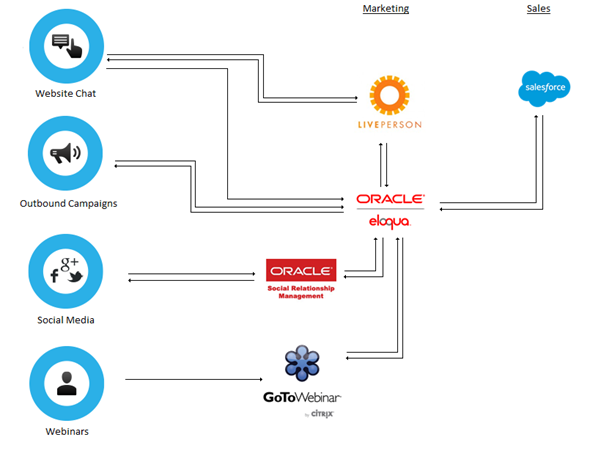
The Eloqua Marketing Systems Mapping Overview is a diagrammatic top level overview of how these different systems are connected to each other and the different marketing channels they are used for. It also show the way in which the data flows between each platform.
Eloqua Marketing Systems Mapping Example
XYZ Inc. has developed a mapping of their Marketing Systems so they can know, at a glance what different systems they are using and how they are integrated. In this example you can see that there is a bi-directional flow of data between:
- Eloqua / SFDC
- Eloqua / SRM
- Eloqua / GoToWebinar
- Eloqua / LivePerson
From this overview we can now see that Eloqua is at the center of all marketing systems.
We can also see from this example uni-directional flows of data / information in relation to marketing channels. The specifics of what the data is will be held later in the Eloqua Architecture Document but for now this information will suffice because this only a high level overview.
Eloqua Marketing Systems Integrations Table
The Eloqua Marketing Systems Integration Table is used to identify each of the different integrations / manual data push that are taking place between the different marketing systems.
There are four columns used for this table:
- Integrated Platforms
- Data Flow
- Description
- Remarks
Integrated Platforms
Integrated Platforms refers to the platforms that have been integrated together. This is the direct connection, not co-dependant integrations. In the example mapping above you can clearly see that most data is flowing through Eloqua from different platforms before ultimately ending up in SFDC. We are not concerned at this overview level of the specifics of the integration, just that it exists.