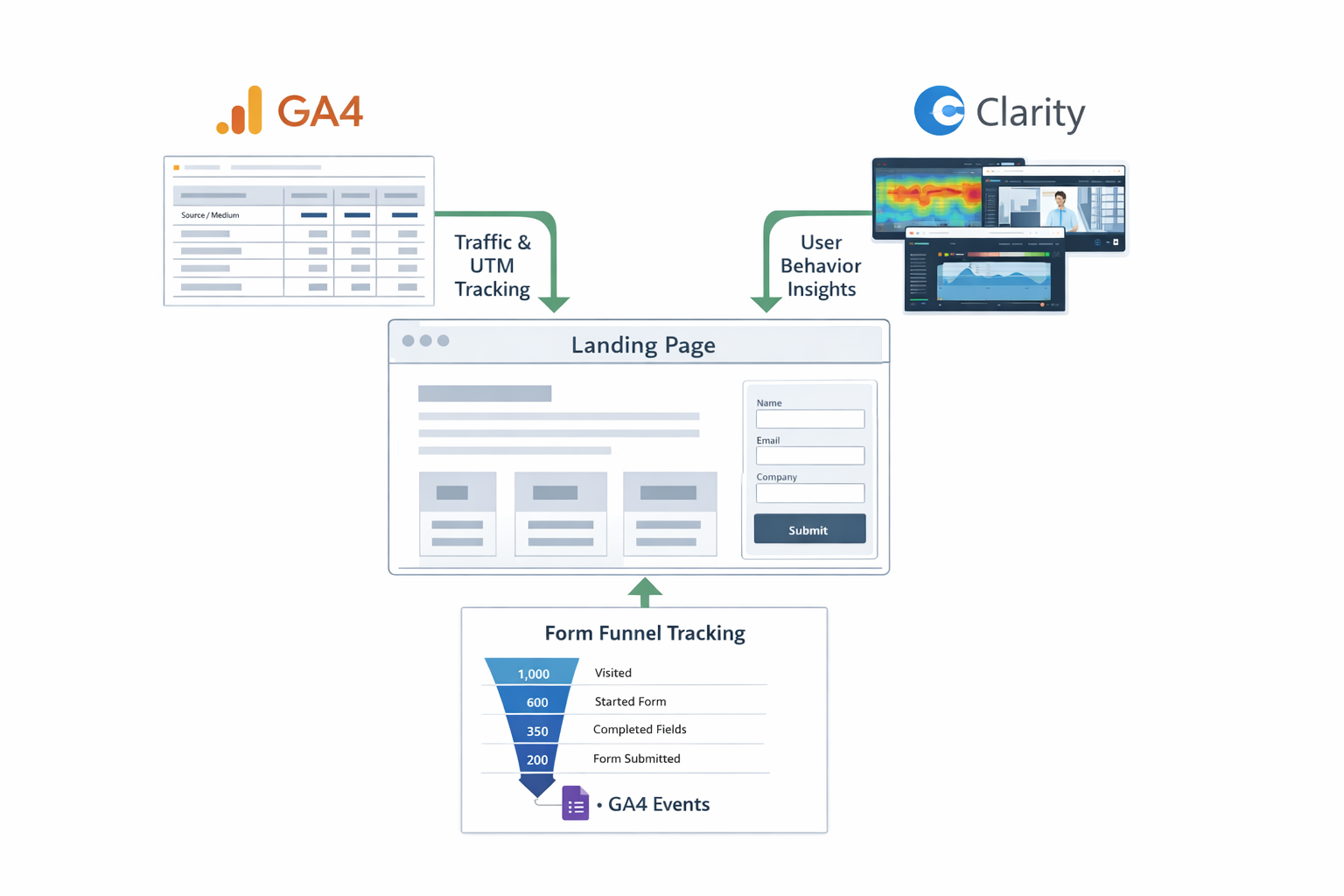
System overview
GA4 (traffic context) → Eloqua landing page + form → Clarity (behaviour) → GA4 form funnel (stage drop-off)

Eloqua · GA4 · Microsoft Clarity · Form Funnels
A practical, repeatable monthly playbook that combines Eloqua outcomes with Google Analytics context, Microsoft Clarity behaviour insight, and free event-based form funnels so you can pinpoint drop-off, fix friction, and ship better landing page templates every cycle.
📅 First published: 11 February 2026
⏱ ⚙ Complexity: Intermediate • 🎯 Focus: GA4, Clarity, Form Funnels, Template Optimisation, Eloqua Outcomes
I kept hearing “our landing pages are fine, we just need more traffic.” That is almost never true. The real problem is that marketers are blind to where people actually drop, hesitate, or quit. So what do companies do? They buy bigger, more expensive tools and burn budget, when the real issue is a lack of reporting discipline and skills. This is not a tech problem, it is a visibility and capability problem. When you combine Eloqua outcomes with Google Analytics context, Clarity behaviour, and a simple event-based form funnel, you finally see why pages win or lose - and you can fix them with confidence instead of guesswork.
Greg Staunton
Most teams try to solve landing page blind spots by buying more and more expensive “CRO” and “analytics” tools. In reality, this is rarely a tooling problem - it is a discipline and capability problem.
Follow this approach and your Eloqua landing page reporting stops being about “submissions” and starts being about visibility. You will clearly see where users drop off, why they drop off, and which traffic sources are worth paying for. Your reports will automatically carry campaign, source, and medium via UTM tagging, making your monthly reviews factual instead of political.
Why you need to do this: because guessing is expensive. This is how you stop burning budget on tool sprawl and start improving templates with evidence.
System overview
GA4 (traffic context) → Eloqua landing page + form → Clarity (behaviour) → GA4 form funnel (stage drop-off)
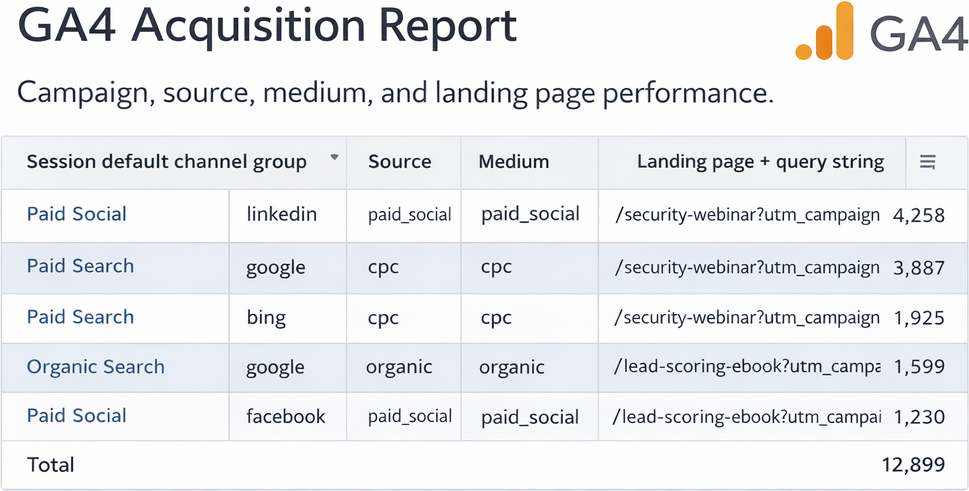
Output 1
Campaign, source, medium, and landing page performance.
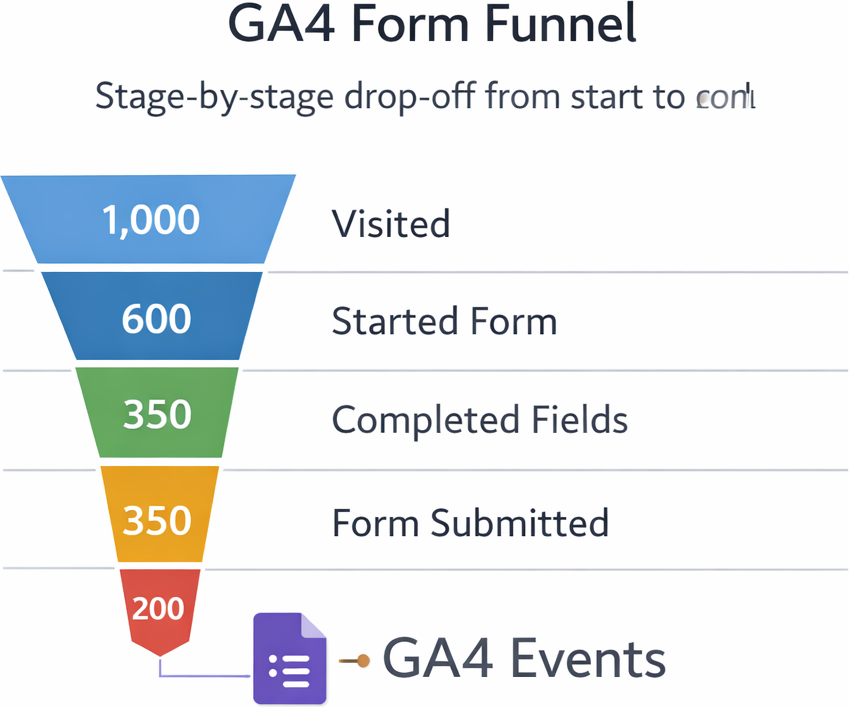
Output 2
Stage-by-stage drop-off from start to submit.
Output 3
Scroll depth, clicks, and attention hotspots.

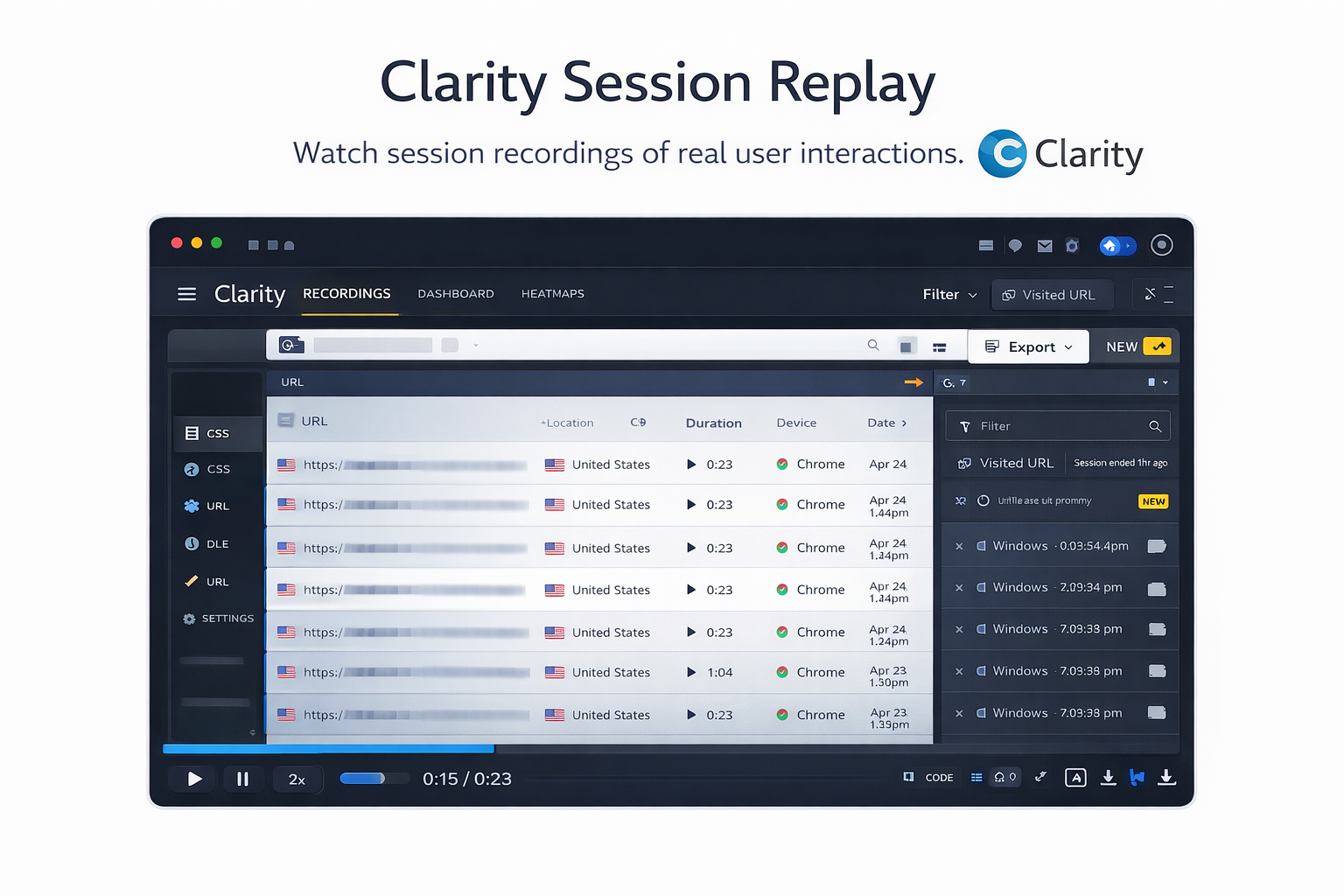
Output 4
Watch real sessions to understand hesitation and abandonment.
“Good reporting” is not a dashboard. It is a monthly routine that tells you what to fix next, using evidence instead of opinions. If your review cannot produce a clear action list, you do not have reporting, you have noise.
A proper review of your Eloqua landing page templates should answer four questions:
The simplest way to keep this honest is to measure three layers, every time: acquisition (who arrived and why), engagement (what they did), and outcomes (what happened after submit).
Eloqua is naturally strong on outcomes. Most teams fall down on acquisition and engagement, then attempt to buy their way out. You can close the gap with three free tools used properly, with a consistent template standard.
Real-world example
One team told me their webinar template was “the best performer” because it had the most submissions. Eloqua showed those submissions produced almost no MQLs. GA4 showed the traffic was mostly low-intent paid social. Clarity showed rage-clicking around a CTA that was buried below the fold. The template was not a winner, it was a loud failure.
GA4 is not glamorous, but it is honest. It does not care about your campaign theme, your internal hype, or the “story” everyone wants to tell. It tells you what happened in the real world. If you want landing pages that actually improve month-on-month, you need one source of truth that cuts through opinions. That is Google Analytics.
Marketers drown in reports. You only need a handful.
GA4 can produce hundreds of views, explorations, and charts. Most are distractions. For Eloqua landing pages, your job is simple: buy the right attention, remove friction, and prove outcome. The reports below are the ones that matter for that job.
What GA4 brings to your monthly landing page review
Real-world example
A whitepaper page hit 10,000 sessions and the team celebrated. GA4 showed 85% came from cheap display. Bounce was 92%. Engagement was near zero. The “winner” was vanity traffic. Meanwhile a demo page had fewer sessions but strong engagement and real MQLs downstream. GA4 stops you lying to yourself.
How I use GA4 in a monthly review (simple and repeatable)
Pull sessions per template and split by channel. If a template is starved, either the offer is weak, distribution is broken, or the page is buried. Own it and fix it.
Look at engagement rate, engaged sessions, and key events. High bounce and low engagement usually means one of three things: the ad lied, the targeting was wrong, or the page disappointed.
Check what people viewed before and after the Eloqua page. If your pages are lonely islands, your content ecosystem is weak and you will keep guessing.
Every review ends with actions. Examples: pause low-intent channels, fix one template’s hero and CTA, remove 3 form fields, standardise UTMs, and rebuild one page path.
hacker console
UTM discipline = automatic campaign, source, medium
# Example URL structure for Eloqua landing pages
https://greg-staunton.com/eloqua-landing-page-reporting
  ?utm_campaign=Q1_Template_Refresh
  &utm_source=linkedin
  &utm_medium=paid_social
  &utm_content=carousel_ad_2
  &utm_term=eloqua_reporting

# What you get in GA4:
# - campaign     = Q1_Template_Refresh
# - source       = linkedin
# - medium       = paid_social
# - landing page = /eloqua-landing-page-reporting
If UTMs are inconsistent, your reporting becomes politics. If UTMs are clean, your reporting becomes operations.
If Google Analytics is logic, Microsoft Clarity is psychology. Eloqua landing page reporting tells you how many people submitted. Clarity shows you why everyone else did not. This is where marketing stops being theory and starts being reality.
What Clarity brings to your monthly review
Real-world example:
A demo page had “bad traffic” blamed for months. Clarity showed 70% of users never saw the form because it was below the fold. Moving the form higher increased submissions by 28% without spending another euro on traffic.
How I use Clarity in a monthly review
Step 1: Pick three templates to deep dive
Each month review the highest converter, the lowest converter, and one average performer. No favourites. No bias.
Step 2: Look for patterns, not one-off behaviour
Do users hesitate before the form? Scroll past key sections? Click things that are not clickable? If you see it repeatedly, it is your page, not your user.
Step 3: Fix something meaningful
Do not optimise everything. Fix one or two high-impact items: form placement, CTA clarity, layout simplicity, section order. Check next month whether Eloqua outcomes improved.
hacker console
Clarity triage checklist
# When Clarity says "something is wrong", it usually looks like:
- Scroll depth dies before the CTA
- Rage clicks on non-clickable UI
- Cursor loops near the form (hesitation)
- Back-and-forth between fields (confusing labels)
- Abandonment right after a validation error

# Your job in the monthly review:
- Find the repeat pattern
- Fix one meaningful thing
- Measure impact next cycleHere is where things get interesting. Eloqua tells you whether a form was submitted. It does not tell you where people dropped off before submission. Paid tools do this nicely, but you asked for free. So here is the smart workaround.
Embed a form (Google Forms is fine for light use), and fire GA4 events at key stages. You get a completely free funnel you can review every month. Combine that with Clarity and you stop guessing.
How this works conceptually
If 1,000 people view the page but only 200 submit, you now know exactly which stage is bleeding conversion.
hacker console
GA4 events for form stages
// Event 1: Form started (first field focus)
document.querySelector("#field_email").addEventListener("focus", function() {
  gtag("event", "eloqua_form_stage", {
    form_name: "Demo_Request",
    stage: "form_started"
  });
});

// Event 2: Core fields completed (example trigger on blur)
document.querySelector("#field_company").addEventListener("blur", function() {
  gtag("event", "eloqua_form_stage", {
    form_name: "Demo_Request",
    stage: "core_fields_completed"
  });
});

// Event 3: Form submitted (submit handler)
document.querySelector("#googleForm").addEventListener("submit", function() {
  gtag("event", "eloqua_form_stage", {
    form_name: "Demo_Request",
    stage: "form_submitted"
  });
});
What this gives you in your monthly review
Even better, combine this with Clarity. Use GA to find the drop point, then watch the sessions where it happens. If GA shows drop after “Company” and Clarity shows hesitation because your dropdown is awful, you have an immediate fix.
Real-world example:
A team saw a massive funnel drop at “Job Title.” It was a 40-option dropdown with internal wording. They switched to free text and validated values downstream. Completion improved by 18% in the next monthly review.
Step 1: Start with Eloqua outcomes
Pull submissions per template, new contacts created, MQLs generated, leads accepted by sales, and any pipeline influenced. If a page has loads of submissions but no quality, it is a vanity page. Call it out.
Step 2: Add GA4 context
Which pages got real traffic? Which channels performed? Which pages had terrible bounce? This is where you stop telling yourself stories.
Step 3: Diagnose with Clarity
Watch real humans interact with your worst performers. If you are not slightly embarrassed, you are not looking closely enough.
Step 4: Analyse your form funnel
Where do users drop? Early or late? Is one template bleeding more than others? The biggest drop is your next optimisation priority.
Step 5: Fix one meaningful thing
Do not change everything. Fix one high-impact item: shorten the form, make a painful field optional, move the CTA, simplify the value proposition. Then measure next month.
hacker console
monthly review checklist
[MONTHLY LANDING PAGE REVIEW]
1) Eloqua outcomes:
   - submissions, new contacts, MQLs, sales accepted, pipeline

2) GA4 context:
   - sessions by page, channel mix, campaign/source/medium, bounce

3) Clarity diagnosis:
   - heatmap + 10 replays for worst template
   - identify repeat friction pattern

4) Funnel stage drop:
   - form_started → core_fields → firmographics → submitted

5) One fix:
- ship ONE change, document, measure next cycleMost marketers love activity. Launch campaigns, build pages, tick boxes. Great marketers love results. If you adopt this approach to Eloqua landing page reporting, you improve conversion rates, raise lead quality, reduce friction, align better with sales, and stop wasting budget on tool sprawl.
The standards mindset
Together, they turn Eloqua landing pages from disposable campaign assets into a continuously improving marketing engine.
Conclusion: treat your landing pages like a system, not a side project.
I help teams implement bulletproof first-touch and last-touch attribution using GTM, GA4 and Eloqua. If your data is unreliable or your reporting is a debate club, I can rebuild your tracking so every lead is correctly sourced and every report finally makes sense.
If you want a senior Eloqua expert who brings discipline, clarity and reliability, I would be happy to speak. Tell me what is slowing your team down and I will give you a clear view on how I can help.
No pressure and no fuss. Just a straightforward conversation.