
The time saving starts with the second landing page. You have already translated the form labels, the country choices and the buttons. You should not have to find them all and paste them in again just because another campaign needs a page.
That was the reason I built a shared language pack for a set of multilingual Eloqua landing pages. The repeated work was in the small interface strings scattered around the forms. The JavaScript holds the language variants for shared header, form and footer text. On page load it reads the HTML lang setting and replaces the tagged front-end text, while retaining the approved values Eloqua expects to receive.
The bigger efficiency is having one place to maintain it over time. Add a translation, introduce shared text or change an approved field configuration in the script, and every connected landing page using those elements can pick up the released update. We do not have to make the same edit separately in each language version. The example below shows the approach before I get into the implementation.
For a sense of scale, the worked example below estimates a 45-minute saving on a small shared label change across twelve pages, with every affected page still checked. That is a planning estimate; the assumptions and calculation are set out below.
See for yourself
These are two short, editable examples for a fictional Acme form. The HTML defines the page language, fields and starting values. The JavaScript holds the translations and applies them when the page loads. Click Run now: live trial to generate the form from your current code in both panes.
Try this: in the HTML, change value="Jamie" to value="Alex". In the JavaScript, change the Spanish firstName text from "Nombre" to "Tu nombre". Run the trial: the input should contain Alex and its label should say Tu nombre.
- Edit the HTML or JavaScript below. Both panes are live inputs to the preview.
- Keep
<html lang="es">for Spanish, change it toenfor English, or tryes-ESto use the Spanish fallback. This compact example includes English and Spanish. - Run the live trial, change the form’s input values and submit it inside the lightbox. The local payload shows the values produced by your current HTML. For example, Alemania still submits
Germany. - Close the preview, make another edit and run again. Your code stays in both panes until you use Reset both examples.
The generated form opens in a lightbox with the article darkened behind it. Only Close preview dismisses it; clicking outside or pressing Escape leaves it open.
To try a new field, add an input and a labelled span in the HTML, such as <span data-i18n="company">Company</span>. Add a matching JavaScript entry, company: { en: "Company", es: "Empresa" }, inside text, then run again. A named input is included in the local payload; translating its label does not rename the field.
The work we were repeating
The obvious translation work was already being done. Each campaign had its own headline, product copy and approved local content. The repetition was in the interface around it: the same form labels, the same dropdowns, the same contact preferences and the same buttons, copied into another page and checked again.
Then a small change would arrive. A label needed correcting. A placeholder had been missed. The form looked Italian until you moved to step two, where the heading was still in English. Each issue was easy enough to fix. Finding every place that needed the fix was taking the time.
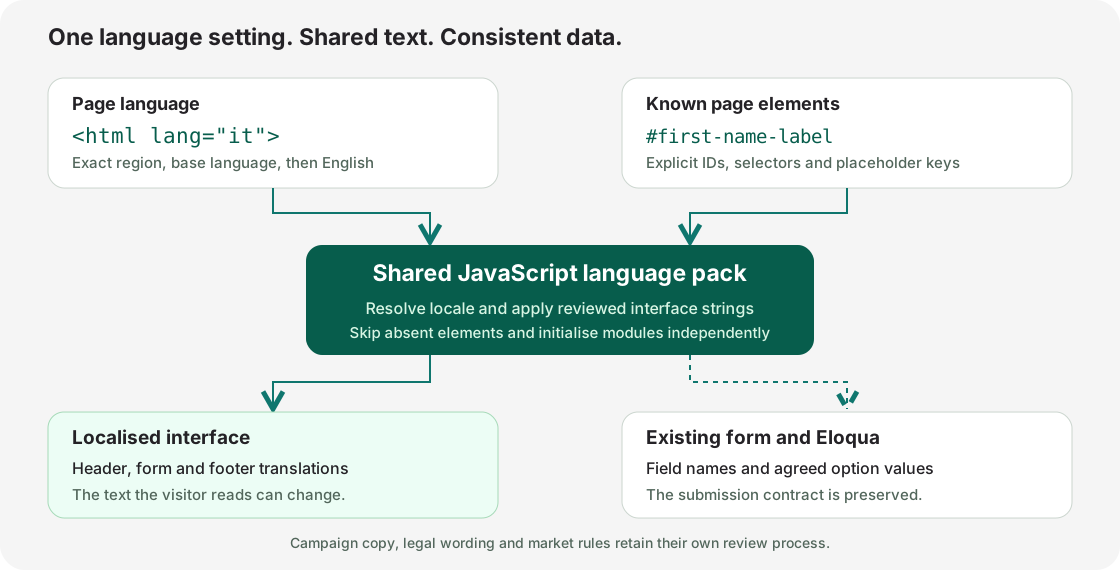
I wanted the next landing page to start with the shared work already done. The approach we settled on was a JavaScript language pack, loaded by the pages that use those common elements. The page tells the script which language to use. The script supplies the interface text. Eloqua still receives the values its processing steps and integrations expect.
This fits an existing HTML and JavaScript setup. There is no requirement to rebuild the pages in a new framework or put a translation service in the visitor’s path. The translations are reviewed strings in a file we control.
What the language pack owns
The shared JavaScript file holds the language variants for the header, form and footer text that it owns. When a page loads, the script reads the HTML lang setting and applies the matching strings to the tagged elements. The front end changes language; the approved backend field names and values remain the same.
The useful boundary is between shared interface text and the content of an individual campaign. I give each a clear owner so a change to a field label does not become an excuse to rewrite a page.
| Part of the page | Where it belongs | What I protect |
|---|---|---|
| Shared interface | The language pack: shared header text, form labels, placeholders, dropdown labels, navigation buttons, step headings, error messages and footer text. | Existing IDs and selectors used by the page. |
| Campaign content | The page’s translation and review process: headline, body copy, images, captions and campaign-specific CTAs. | Approved wording, formatting and product context. |
| Data and processing | The existing form, Eloqua processing and integration mappings. | Field names, option values, hidden attribution fields and submission behaviour. |
| Market-specific content | Approved wording and destinations supplied by the relevant owner. | Privacy links, consent wording, distributor destinations and country rules. |
Our pack also applies the approved country-specific privacy wording and the matching language and country destinations for header, privacy and footer links. The wording and URLs are supplied through the market approval process, then mapped explicitly in the script.
What happens on page load
There are three parts to wire together: the HTML language setting, tagged elements in the page and the shared JavaScript file. The language variants are already stored in the script. It does not translate the page by calling a service at runtime.
<!doctype html>
<html lang="es">
<head>
  <meta charset="utf-8">
  <script src="/js/acme-language-pack.js" defer></script>
</head>
<body>
  <header>
    <span id="header-message">Practical tools for busy teams.</span>
  </header>

  <form>
    <label for="firstName">
      <span id="first-name-label">First name</span>
    </label>
    <input id="firstName" name="firstName">

    <label for="country">Country</label>
    <select id="country" name="country">
      <option value="Germany">Germany</option>
    </select>
  </form>

  <footer>
    <span id="rights-label">All rights reserved.</span>
  </footer>
</body>
</html>
The span tags do not activate themselves. They mark the pieces of visible text the JavaScript is allowed to replace. Their IDs, or an agreed data attribute, let the script find the right element without changing the surrounding layout or the form field’s name.
- The browser builds the page, including its header, form and footer.
- The shared script runs after the DOM is ready and reads
document.documentElement.lang. In this example, that ises. - The pack resolves the language key and selects the stored Spanish variants for its tagged elements.
- It changes visible text and approved display attributes, such as a placeholder or a link destination.
- The form keeps the approved backend values, so selecting a translated country label still submits the agreed country value to Eloqua.
If I change the declaration to <html lang="fr"> and reload the same prepared page, the shared header, form and footer text uses the French entries instead. The JavaScript file and its dictionaries stay the same. The setting is read on page load; changing the attribute later would need an explicit re-render if live switching were required.
Resolving the language and its fallback
The page starts with a language declaration. For an Italian page, that is simply:
<html lang="it">Our pack reads document.documentElement.lang, normalises the key and looks up the matching entry. The production work also had some older keys to support. The resolver was the right place to handle those aliases, rather than adding another exception to each page.
function resolveLang() {
  const raw = (document.documentElement.lang || 'en')
    .trim().toLowerCase().replace(/-/g, '_');

  const aliases = {
    sv: 'se', sv_se: 'se',
    da: 'dk', da_dk: 'dk'
  };

  return aliases[raw] || raw;
}

const LANG = resolveLang();

function t(map) {
  return map[LANG] || map[LANG.split('_')[0]] || map.en || '';
}
That lookup gives us an exact regional entry first, then the base language, then English. For example, a fr-BE page can use a Belgian French entry where one exists and the French entry for the rest of the interface. We do not have to duplicate a complete dictionary to change one phrase.
The legacy se and dk keys in this example are internal compatibility aliases. New HTML should use the standard language tags, such as sv and da. If I were starting a fresh pack, I would use standard tags in the dictionary too.
An English fallback keeps an incomplete map usable, but it can also conceal a missing translation. I treat a fallback as something to check before release, not proof that the page is finished. The compact Acme demo includes English and Spanish. An es-ES page falls back to its Spanish entries, using the same lookup order.
Labels and placeholders use the same wording
We already had a dictionary for field labels. When placeholders needed translating, adding a second dictionary would have given us two copies of the same wording to maintain. We reused the existing keys.
<label for="firstName">
  <span id="first-name-label">First name</span>
</label>
<input
  id="firstName"
  name="firstName"
  data-placeholder-id="first-name-label"
>
The markup supplies a stable hook for the shared text. The field ID and HTML name continue to belong to the form. A small rendering function can apply the same translation to both the label and the placeholder:
const fieldLabels = {
  'first-name-label': {
    en: 'First name',
    fr: 'Prénom',
    de: 'Vorname',
    it: 'Nome'
  }
};

function initFieldLabels() {
  Object.entries(fieldLabels).forEach(([id, map]) => {
    const label = document.getElementById(id);
    if (label) label.textContent = t(map);
  });

  document.querySelectorAll('[data-placeholder-id]').forEach(field => {
    const map = fieldLabels[field.dataset.placeholderId];
    if (map) field.placeholder = t(map);
  });
}
This is a trimmed example of the pattern, not a replacement for a complete production pack. In an existing implementation, I limit placeholder changes to the fields agreed in scope and check that the selectors match the actual page. I do not want a general text-replacement script guessing which parts it should touch.
A translated dropdown still has to submit the right value
This is the part I check before I call a localised form ready. A dropdown has a visible label and a submitted value. A visitor needs the label in their language. Eloqua needs the value agreed in the field mapping.
<option value="Germany">Deutschland</option>The German visitor sees “Deutschland”. The form submits Germany. If an existing segment, CRM mapping or routing rule expects that English value, replacing it with the translated label changes the data contract.
| Page language | What the visitor sees | What the form submits |
|---|---|---|
| English | Germany | Germany |
| German | Deutschland | Germany |
| French | Allemagne | Germany |
We worked on keeping that distinction intact for countries and communication languages. It also applies to job roles and contact methods. Translating an option’s textContent does not require changing its value.
const countryLabels = {
  Germany: { en: 'Germany', de: 'Deutschland', fr: 'Allemagne' }
};

document.querySelectorAll('select[name="country"] option')
  .forEach(option => {
    const map = countryLabels[option.value];
    if (map) option.textContent = t(map);
  });
Some older modules identified an option by its existing English display text. That can work with known markup, but a text edit can break the match. For new modules, I prefer a stable value or an explicit translation key. The Acme example uses the option value for its lookup.
You can check this in the preview. Select a country and submit the sample form with made-up details. The local payload display shows the English country value, even when the dropdown label is translated. It creates no Eloqua contact and sends nothing to a CRM.
The form looked translated until somebody used it
One issue in the real work was particularly easy to miss. The language pack contained the translated error message, but a form function wrote a hardcoded English message when validation ran. On the initial screen, everything looked fine. The problem only appeared after an invalid submission.
The same can happen with step headings. Translating the first heading in the HTML is not enough if the stepper writes “Step 2 of 3” from its own English string when the visitor clicks Continue.
Our pack exposed translated step hints for the stepper to use. The important part is that the code rendering each new state actually reads those hints:
// Supplied by the language pack.
window.demoStepHints = {
  1: t({
    en: 'Step 1 of 3: Your details',
    it: 'Fase 1 di 3: I tuoi dati'
  }),
  2: t({
    en: 'Step 2 of 3: Your address',
    it: 'Fase 2 di 3: Il tuo indirizzo'
  })
};

// Consumed by the existing stepper whenever the step changes.
function updateStepHeading(stepNumber) {
  const heading = document.getElementById('stepHint');
  const text = window.demoStepHints?.[stepNumber];
  if (heading && text) heading.textContent = text;
}
For errors, the validation rule should continue to decide whether a field is valid. The language layer supplies the appropriate message. Moving a string into a dictionary should not change which fields are required, how an email address is checked or when a form is allowed to submit.
That is why my review includes going forwards and backwards through the form, submitting it empty, entering an invalid email address and correcting the error. Looking at the starting page tells you very little about the later states.
Page language, country and communication language are separate
A French page does not tell you that the visitor lives in France. A country selection does not always tell you which language they want future emails in. Treating those as one setting is a quick way to make a multilingual form confusing.
| Setting | What it controls | Example |
|---|---|---|
| Page language | The text shown on this visit. | <html lang="fr-BE"> |
| Country | Location data and any agreed country-dependent fields. | A visitor chooses Switzerland. |
| Communication language | A stated preference for future contact. | The visitor chooses French from the approved choices. |
We worked through language-name labels and their capitalisation while preserving the English values used by Eloqua. We also checked the country-dependent visibility and choices for the communication-language field.
There needs to be one clear owner for that behaviour. Two country-change handlers, both changing the same field, can give different results depending on which runs last. The language pack should supply the display text without quietly creating a competing set of country rules.
Approved privacy wording and links for each market
The pack also holds the approved privacy wording for each country and language combination. This is the wording approved for that market, not simply a direct translation of a single English notice. The page’s configured language and country context selects the appropriate entry from the pack.
We applied the same approach to the links around the page. Header links, privacy links and footer links point to the specific pages they are meant to open within the main website’s matching language and country section. A Spanish page for Spain uses its approved Spanish and Spain-specific destinations. A French page for Belgium uses the approved Belgian French destinations.
| Page element | What the language pack applies |
|---|---|
| Privacy text beside the form | The approved notice for the page’s country and language, including the appropriate linked text. |
| Header and navigation links | The intended corporate homepage or other destination in the correct language and country section of the main website. |
| Privacy-policy link | The exact approved privacy-page URL for that market and language. |
| Footer links | The intended legal, privacy, contact or other corporate pages for the relevant language and country. |
The approved text and destination URLs are explicit entries in the configuration. We do not guess a legal destination by changing a country code in a URL. On page load, the script reads the HTML language setting, uses the configured market mapping, updates the tagged text and sets the relevant links’ href attributes. The form’s approved backend values stay intact.
The page’s market configuration is separate from the visitor’s country answer in the form. Any behaviour that changes wording or links after a visitor selects a country needs to be deliberately defined. For release, I open the mapped destinations and check that they show the intended page in the correct language and country context. A link returning a successful response is only part of that check.
Where the time saving actually comes from
The initial pack is extra work. You have to identify the shared elements, collect the translations, wire up the selectors and test the result. I would not sell it as a shortcut for a single page that will never be used again.
The return comes when the same interface is used again. The next campaign can inherit the reviewed labels and dropdown text. A correction has one place to go. A new language can be added against a known set of keys instead of rediscovered in a collection of copied pages.
One script to maintain as the landing pages evolve
The work does not stop when a campaign launches. New fields are requested, wording gets revised, dropdown choices change and another market needs its own version. With a shared script, those common definitions have one place to live.
Every connected landing page references that same script. When we add shared text, extend the translations for a field or update a centrally managed option list, we make the change once, test it and release the shared file. The connected pages using those elements pick it up on their next load once the new version is being served. The header, form, privacy text and footer do not each need a separate edit in every language page.
For a new field, we can maintain its labels, placeholders, dropdown choices and validation messages centrally. The field’s HTML still needs to exist in the shared form template or the relevant pages, with the agreed Eloqua field mapping. Once that is in place, its common configuration can be maintained through the pack.
The same principle applies when approved field values need to change over time. The shared definition is updated deliberately, checked against the Eloqua and CRM mappings and then released to the pages that use it. Ordinary localisation continues to preserve backend values; an approved mapping change is handled as a controlled update.
That is the lasting saving for me: one maintained script, a clear set of approved definitions and fewer copies of the same configuration drifting apart. It becomes easier to support the whole collection of landing pages as the requirements grow.
| Task | With separate page edits | With a shared pack |
|---|---|---|
| Reuse an existing form | Find and replace its interface strings again. | Load the shared pack and verify the page’s language and selectors. |
| Correct a common label | Locate the label in each connected variant. | Change the owned dictionary entry, then regression-test the affected pages. |
| Add a language | Find the complete set of interface strings across the page. | Translate the known keys and review the remaining page-specific content. |
| Introduce a new shared field | Add and translate its interface text separately in every page variant. | Add the field to the shared form or relevant pages, then maintain its labels, choices and messages once in the pack. |
| Update approved field values | Find every copy of the option list or mapping and keep them aligned. | Update the shared definition, verify the backend mappings and release it across connected pages. |
| Revise shared text or a market link | Repeat the edit across the affected landing-page variants. | Update the approved text or URL entry in one place and check the affected markets. |
| Investigate English text in a local form | Search page markup and scripts for the source. | Check the dictionary, selector and function that writes that state. |
What that could save on twelve landing pages
To put some realistic numbers around it, take twelve separately maintained landing pages: two campaigns in each of six languages. Assume the pages already load the shared pack, their selectors are in place and the translations, privacy wording and destination URLs have been approved. These are illustrative planning estimates, not timings measured on the client work.
The comparison includes hands-on editing, testing every affected page and a 15-minute release allowance for each change batch. Translation writing, approval waiting time and the original language-pack build are outside the figures on both sides. A new field is assumed to be approved and already configured in Eloqua.
| Change | Separate page edits | Shared script | Estimated time saved |
|---|---|---|---|
| Correct one shared label in the existing languages | 2 h 15 min | 1 h 30 min | 45 min |
| Update approved privacy wording and its market links | 3 h 15 min | 2 h | 1 h 15 min |
| Add one simple field with translated labels and choices | 6 h 15 min | 4 h 45 min | 1 h 30 min |
For the small label correction, the separate-page estimate is five minutes editing and five minutes checking each page, plus the release: 12 × 10 minutes + 15 minutes = 2 hours 15 minutes. With the pack, allow 15 minutes for the central edit, the same 60 minutes of page checks and 15 minutes to release: 1 hour 30 minutes. That saves roughly 45 minutes on one small change without reducing the testing.
The privacy-and-links example allows ten minutes of editing per page, or 45 minutes to update the six approved market entries centrally. Both approaches retain five minutes of checking per page. For the new field, both include two hours for adding the input markup across the twelve pages, ten minutes of QA per page and the release allowance. The saving comes from maintaining the labels and choices once: 30 minutes centrally instead of ten minutes of repeated configuration per page.
Across those three example change batches, the total moves from 11 h 45 min to 8 h 15 min. That is about 3 h 30 min saved, or roughly 30% less hands-on effort in this particular workload. It is a useful planning example for recurring maintenance, not a claim that every task becomes 30% faster.
The initial build still has to earn its time back. If the pages use different form structures, the translations need reapproval or a value change affects CRM routing, the estimate needs to include that extra work. The repeatable saving is the page-by-page editing that a shared definition removes.
If your team has reached the point where a small wording correction means opening a long list of landing pages, a shared language pack is worth considering. Start with one common form and a few languages. Be precise about what the pack owns, preserve the Eloqua field mappings and test the form after somebody has actually used it.
Talk to me about your Eloqua landing pages, or read the other Eloqua development articles.